
Solstice Dynamic Parametric EQ: Operation Manual & Studio Reference Guide
Version: 1.0.2
Device Classification: Studio Effects / Equalizer & Dynamics (EQ, Dynamics, Audio Meter, Sidechain, Mastering)
Rack Format: Selectable 3U / 4U / 5U Main Display, plus a hideable +1U Hardware Drawer (up to 6U total) and a compact folded strip
System Requirements: Reason 14.0 or later (including Reason Free and Reason+; macOS Universal & Windows 64-bit)
Author: Edward Boraas
1. Overview
Solstice is a 24-band dynamic and analog-character parametric equalizer built natively for the Reason Rack.
Everyday channel EQ work stays fast and uncluttered, while deeper mixing, mastering, and modular tools sit one click away when a session calls for them:
- Drop It In as a Zero-Overhead Static Channel EQ: In the Default patch, six starter bands (High-Pass, Low Shelf, two Bells, High Shelf, and Low-Pass) sit at 0.0 dB. Until you move a band, Solstice passes audio with bit-exact transparency and 0.0% filter CPU overhead so you can place it on every channel without taxing your session. (Right-clicking the device and choosing Reset Device initializes a clean 0-band slate.)
- Turn Any Band Dynamic in One Gesture: Every band (1 to 24) across all eight filter shapes includes an independent downward and upward dynamic section (±18.0 dB range, 1.5:1 to 20.0:1 ratio, 0.5 to 250 ms attack, 5 to 1000 ms release, Above Threshold or Below Threshold gate/lift direction, Manual or crest-riding Auto Threshold, and internal, cross-band Key: Band 1 to 24, or external sidechain triggering).
- Dial In Analog Character (Precise / Subtle / Warm / Vintage): Keep your filters 100% mathematically pure in Precise mode, or engage Subtle, Warm, or Vintage Character (globally or per band) for thermal and power-supply micro-drift, independent Left/Right component tolerances, and bandwidth-normalized filter saturation.
- Match Tones or Unmask Collisions: Open the EQ MATCH bar to match your track against reference stems, live external sidechains, or studio target curves (Static EQ or Dyn Auto), or select SC Unmask to automatically place up to 16 external-sidechain-keyed dynamic cuts at the exact frequencies where a vocal or kick collides with your track.
- Solve Reason Routing Traps Without Splitters: Use Stem Iso (-Self or Dry Key), rear SC Thru / SC Sum In/Out chaining, and the 72-jack 24-band CV matrix (including silent KEY and CV envelope follower modes) to handle complex sidechain and modular setups inside a single rack unit.
2. Front-Panel Guided Tour (3U / 4U / 5U Main Display)
Solstice opens at a compact 3U height for everyday mixing, keeping the focus on the 640-bin real-time analyzer display, interactive satellite nodes, and bottom HUD bar. In the top-right header, click SIZE to resize the main display between 3U, 4U, and 5U, or click DRAWER to open and close the lower +1U Hardware Drawer (up to 6U total). Both your display size and drawer state are saved with your Reason song so browsing patches never resets your layout.

2.1 Top Header Strip & Top-Right Display Pills
- BYP / ON / OFF Switch: 3-state power and bypass switch on the top left. Selecting BYP bypasses audio processing while keeping the FFT analyzer running (Live-Spectrum Bypass) so you can visually and audibly compare pre/post changes.
- Patch Browser: Recessed patch display with previous/next arrows, folder browser, and save button for loading Solstice’s 31 factory patches.
- SIZE (3U / 4U / 5U): Resizes the main analyzer display height on the fly (click to step or drag vertically).
- DRAWER (CLOSED / OPEN): Expands or collapses the lower +1U Hardware Drawer.
- Top-Right Display Bar Pills: Quick-access pills sit inside the top-right corner of the analyzer screen:
CLEAR PEAKS(Contextual: Shown in INF Peak Hold Mode): Appears on the left side of the top-right pill bar whenever PEAKS is set to INF (Infinite Peak Hold) in the drawer or right-click menu. Click[CLEAR PEAKS]at any time to reset the held infinite maximum spectrum envelope back to the current live signal.A | B | A > B(Dual Setup Compare & Copy): Switches between two complete 24-band EQ + Dynamics + Mastering setups (Setup A and Setup B, capturing all 24 bands and global character/scale/output controls) or copies the active setup into the other slot (A > BorB > A). Until you engage B (by switching to B or clickingA > B), B automatically mirrors whatever patch you load into A so B is always that patch’s untouched starting point. Once B is engaged, loading a patch loads only into the currently active slot (A or B) while preserving the inactive slot, so you can switch to B, load a second preset, and A/B directly between two different presets.DRAW/DRAW: ON(Unified Freehand Curve Draw): Toggles one-stroke freehand EQ curve sketching on the main display. WhileDRAW: ONis active, click and drag across the graph to sketch a custom target curve: releasing the mouse automatically fits and applies 4 to 16 parametric bands to match your drawn shape (or hold Shift while dragging to sketch multiple strokes and clickDRAW: ONwhen ready to commit).- EQ MATCH: Opens or closes the 8-cell EQ Match & Sidechain Unmask bar across the top of the graph.
- CHAR (PRECISE / SUBTLE / WARM / VINTAGE): Sets the global Analog Character mode (click to open the menu, or Shift + Click to cycle).
- VIEW (STEREO / MID / SIDE / LEFT / RIGHT): Filters the spectrum analyzer and visible EQ curves to inspect a specific stereo channel in isolation (click for menu, Shift + Click to cycle).
- NODES (SHOW / DIM / LOCK): Shows all EQ nodes normally, dims nodes for an unobstructed view of the spectrum, or locks all nodes against accidental mouse drags while keeping the HUD bar and drawer controls active.
2.2 The Perimeter Rulers & 2D Gutter Zoom/Pan
The outer borders of the analyzer display act as live interactive rulers and zoom/pan gutters (hovering over the graph displays a crosshair cursor with exact Hz, musical note + cents, EQ dB, and spectrum dBFS readouts):
- Left Gutter: EQ Gain Scale (±3 dB to ±36 dB Zoom, ±72 dB Pan):
- Drag Rightward / Leftward (into/away from the display): Continuously zooms the vertical EQ gain scale between ±3 dB and ±36 dB.
- Drag Vertically: Pans the vertical dB center across ±72 dB (with automatic single-axis lock so panning never shifts your zoom level).
- Double-Click (or Alt/Option + Click): Resets vertical zoom and pan to the selected display RANGE (±12, ±24, or ±36 dB centered at 0 dB).
- Bottom Gutter: Frequency Scale & 108-Key Piano Roll (20 Hz to 20 kHz, up to 12.5x Zoom):
- Drag Upward / Downward (into/away from the display): Zooms the horizontal frequency axis up to 12.5x anchored directly at your cursor frequency.
- Drag Horizontally (while zoomed): Pans smoothly across the 20 Hz to 20 kHz spectrum.
- Click on the 3D Piano Roll Strip (C0 to B8): Snaps the selected band’s frequency directly to that exact musical note fundamental (A4 = 440 Hz, equal temperament), while dragging a band’s colored note dot (or Shift-dragging on the Piano Roll) scrubs across musical notes.
- Double-Click (or Alt/Option + Click): Resets horizontal zoom to the full 20 Hz to 20 kHz span.
- Right Gutter: Spectrum dBFS & Dynamic Threshold Scale (-60 to 0 dBFS):
- Click or Drag Vertically: Directly sets and scrubs the selected band’s Dynamic Threshold (-60 to 0 dBFS in 1 dB steps, or hold Shift for 0.1 dB fine resolution) aligned with the spectrum dBFS ruler.
- Cmd/Ctrl + Click: Resets the selected band’s threshold to its frequency-aware default (or 0.0 dB offset in Auto Threshold mode).
2.3 On-Canvas Node & Satellite Handles (N, Q, D, T, S)
Hovering or selecting any active band reveals its five-point satellite cluster (while dragging Q, D, or T, the center node collapses into a precision crosshair dot so it never obscures the curve):
- Center Puck (N: Frequency & Static Gain):
- Drag: Moves Frequency (20 Hz to 20 kHz) and Static Gain (±24.0 dB).
- Shift + Drag: 0.1x fine precision mode (re-anchors smoothly if pressed or released mid-drag).
- Alt/Option + Drag: Adjusts Q (0.10 to 36.0) vertically without leaving the center node.
- Cmd/Ctrl + Drag: Momentarily solos the band (Band Solo) while sweeping frequency and gain.
- Double-Click: Resets Static Gain to 0.0 dB (or toggles the band On/Off if already at 0.0 dB).
- Shift + Double-Click: Deletes/deactivates the band (Bands 2 to 24 return to the dormant pool; Band 1 resets to a 20 Hz High-Pass).
- Left 9 o’clock Wing (Q: Bandwidth / Resonance): Drag vertically or horizontally to adjust Q (0.10 to 36.0); single-click or double-click resets Q to 0.71.
- Top/Bottom 12/6 o’clock Handle (D: Dynamic Range, ±18.0 dB): Drag vertically to set downward compression (-18.0 to 0.0 dB) or upward expansion (0.0 to +18.0 dB); Single-Click toggles dynamics Off ↔ On for instant A/B; Double-Click resets Dynamic Range to 0.0 dB.
- Right 3 o’clock Wing (T: Threshold / Auto Sensitivity): Drag vertically to set manual threshold (-60.0 to 0.0 dBFS) or Auto Sensitivity (-15.0 to +15.0 dB) against the live cyan threshold guide line (Shift + Click toggles Manual ↔ Auto Threshold).
- Opposite-Side Badge (S: Band Solo): Sits at 6 o’clock by default and flips to 12 o’clock whenever D moves below the node so the two handles never overlap. Click to latch/unlatch Band Solo; Drag to momentarily solo while sweeping frequency and gain.
2.4 Multi-Band Selection & Right-Click Context Menu
- Multi-Band Marquee & Shift-Click: Drag a selection box across empty graph space (or Shift + Click nodes) to select multiple bands at once. Dragging any selected handle adjusts all selected bands together while preserving their relative musical pitch intervals and gain offsets.
- Right-Click Context Menu: Right-clicking any band node opens submenus for Filter Shape, Filter Slope, Stereo Placement, Band Character, Dynamics & Detector (Threshold Mode, Trigger Direction, Internal/External Sidechain, Detector Focus, and Key from Band 1 to 24), plus quick actions for Solo Band, Invert Band Gain (+/-), Toggle Band Bypass, Reset Band to Default, and Delete Band. Right-clicking empty graph space lets you add a specific filter shape at the cursor frequency, set Global Character, or reset display zoom.
3. The Two-Page Bottom HUD Bar & Direct Numeric Entry
The bottom of the analyzer display houses a 10-cell interactive HUD bar that updates for whichever band (or multi-band group) is currently selected:
- Single-Click any discrete cell: Opens an on-screen popup menu directly above the cell.
- Single-Click or Double-Click any numeric cell: Opens the On-Screen Numeric Keypad where you can enter exact numeric values (e.g.,
2500,2.5+kHz,-3.5, or0.71) and click OK. - Vertical Drag on any cell: Scrubs the parameter continuously (hold Shift + Drag for 0.1x fine tuning).
- Alt/Option + Click (Shift + Click reverse): Steps cleanly through discrete options.
3.1 HUD Page 1/2 (Everyday EQ & Inline Dynamic Triggers)
| Cell | Header Label | Controls & Behavior |
|---|---|---|
| Cell 0 | ACTIVE | Left < / > arrows cycle through active bands (or Alt + Click to wake the next dormant band); clicking the center opens the 24-band selector menu. |
| Cell 1 | STATE | Toggles the selected band ON or OFF. If a bypassed band is feeding another band’s cross-band detector or a rear CV output, it displays KEY (cyan), CV (emerald), or K+CV standby. |
| Cell 2 | FILTER SHAPE | Selects filter shape: Bell, Low Shelf, High Shelf, Notch, Tilt Shelf, High-Pass, Low-Pass, or Band-Pass. |
| Cell 3 | FILTER SLOPE | Selects filter steepness for all filter shapes: 6 dB/oct, 12 dB/oct, 24 dB/oct, or 48 dB/oct. |
| Cell 4 | PLACEMENT | Selects stereo channel routing for the band: Stereo, Mid, Side, Left, or Right. |
| Cell 5 | FREQUENCY | Band center/cutoff frequency (20.0 Hz to 20.0 kHz) plus nearest musical note and cents readout on hover. |
| Cell 6 | STATIC GAIN (or CUTOFF MOD) | Static EQ gain (-24.0 to +24.0 dB) for Bell, Shelf, and Tilt shapes (displays 0.0 dB (CUT) on High-Pass, Low-Pass, Notch, and Band-Pass shapes). |
| Cell 7 | Q FACTOR | Filter bandwidth / resonance Q (0.10 to 36.00; defaults to 0.71 on cuts/shelves, 1.00 on bells). |
| Cell 8 | DYN RANGE + [BAND] Pill | Main area sets Dynamic Range (-18.0 to +18.0 dB, or OFF at 0.0 dB; sweeps cutoff 1 oct / 6 dB on High-Pass/Low-Pass). Top-right [BAND / WIDE / LOW / KEY:B#] pill opens the Detector Focus menu directly on Page 1 (or Shift + Click / drag vertically on the pill to cycle). |
| Cell 9 | THRESH + [INT] [MAN] Pills | Main area sets Manual Threshold (-60.0 to 0.0 dB) or Auto Sensitivity (-15.0 to +15.0 dB). Top-right [INT / EXT] pill toggles Internal vs. External Sidechain, and [MAN / AUTO] toggles Manual vs. Auto Threshold directly on Page 1. |
| Right | PAGE 1/2 | Click (DYN / CHAR >) to flip Cells 2 to 9 to HUD Page 2/2. |
3.2 HUD Page 2/2 (Ballistics, Ratio, Trigger Direction, Detector & Character)
| Cell | Header Label | Controls & Behavior |
|---|---|---|
| Cell 0 to 1 | ACTIVE / STATE | Same active band selector and ON / OFF / KEY / CV state toggle as Page 1. |
| Cell 2 | DYN ATTACK | Envelope detector attack time (0.5 ms to 250 ms, default 3.5 ms). |
| Cell 3 | DYN RELEASE | Envelope detector release time (5 ms to 1000 ms, default 65 ms). |
| Cell 4 | DYN RATIO | Dynamic compression/expansion ratio (1.5:1 to 20.0:1, default 4.0:1, with a smooth 6 dB soft knee). |
| Cell 5 | DYN DIRECTION | Selects ABOVE (COMP) (triggers when signal exceeds threshold) or BELOW (GATE) (triggers when signal drops below threshold for frequency-selective gating or low-level upward detail lifting). |
| Cell 6 | DETECTOR MODE | Selects detector focus: PEAK (BAND FOCUS), WIDEBAND, LOW 100Hz, or cross-band KEY: BAND 1 to 24. |
| Cell 7 | KEY SOURCE | Switches the band’s detector input between INTERNAL and rear-panel EXT SIDECHAIN, plus the top-right [MAN / AUTO] threshold mode pill. |
| Cell 8 | CHARACTER | Per-band Character override: DEF: PRECISE/… (follows global setting), PRECISE, SUBTLE, WARM, or VINTAGE. |
| Right | PAGE 2/2 | Click (< EQ / CORE) to return to HUD Page 1/2. |
4. Dynamic EQ, Smart Detectors, Cross-Band Keying & Crest Mode
4.1 Upward & Downward Dynamics on Every Filter Shape
Solstice supports full ±18.0 dB dynamic movement across all 8 filter shapes:
- Bell, Low/High Shelf & Tilt Shelf: Negative Dynamic Range ducks gain when triggered; positive Dynamic Range boosts gain when triggered.
- High-Pass & Low-Pass Cut Filters: Dynamic Range sweeps the filter’s cutoff frequency in real time by 1 octave per 6 dB (up to ±3 octaves), letting you build dynamic bass tighteners or transient-controlled low-pass filters without CV cables.
- Above vs. Below Threshold Direction:
- Above (Default): Acts when signal energy rises above the threshold (negative Dynamic Range = downward compressor/de-esser; positive Dynamic Range = upward transient expander).
- Below (Gate / Lift): Acts when signal energy falls below the threshold (negative Dynamic Range = frequency-selective downward gate that clamps drum ring or noise between hits; positive Dynamic Range = low-level upward lifter that brings up quiet ghost notes without boosting loud hits).
4.2 Frequency-Aware Manual Defaults & Crest-Riding Auto Threshold
- Frequency-Aware Manual Thresholds: Because musical mixes naturally roll off from low bass to high air, Solstice initializes each band’s manual threshold along a smooth spectral slope (-16.0 dB at 80 Hz down to -36.0 dB at 20 kHz). Adding Dynamic Range to a 10 kHz air band or a 100 Hz bass band reacts immediately without dragging the threshold down from 0 dBFS.
- Auto Threshold (AUTO): When switched to AUTO (via the [MAN / AUTO] pill on HUD Page 1, Shift + Click on T, or Right-Click), the band tracks its own long-term program floor (350 ms upward acquisition / 1.2 s downward release) and triggers on transient crests. Dragging T or the THRESH cell adjusts Auto Sensitivity (-15.0 to +15.0 dB) relative to the tracked floor, and switching back to MAN performs a bumperless handoff to the exact effective dBFS threshold.
4.3 Detector Focus & Bidirectional Cross-Band Keying (K ► B)
Clicking the [BAND] pill in the DYN RANGE cell on HUD Page 1 (or DETECTOR MODE on Page 2) selects what frequency region triggers the band:
- Band Focus (Self): Listens to the band’s own frequency, Q, and stereo placement.
- Wideband (Full Range): Listens to the full-range signal.
- Low 100Hz (Sub / Kick): Listens through a dedicated 100 Hz low-pass filter so kick hits can trigger midrange or high-frequency bands without external patching.
- Key: Band 1 to 24 (Cross-Band Keying): Keys the selected band off any other band (1 to 24) inside Solstice.
- Bidirectional Visual Link (K ► B): Whenever either the Target Band (B) or the Key Source Band (K) is selected, hovered, soloed, or dragged, Solstice draws a dashed cyan link line from K to B with a directional chevron arrowhead (►) and a KEY B# > B# badge at the midpoint, plus a projected threshold tick at the key band’s frequency.
- Silent KEY Standby: Turning a key source band Off leaves its detector active in silent KEY standby (0.0 dB audio EQ) so you can use any band purely as a tunable internal trigger filter.
4.4 Statistical Spectrum (PEAKS: CREST) & One-Click Crest Grab
In the +1U drawer (REAL-TIME FFT ANALYZER bay), switching PEAKS from PEAKS to CREST renders a two-stage statistical Crest Excursion Ribbon across the spectrum:
- The shaded inner band shows the sustained musical body (1-sigma average energy), while the outer envelope shows fast transient crests (2-sigma P95 peaks).
- One-Click Crest Grab: Clicking a peak on the spectrum while in CREST mode creates a 0.0 dB static-gain dynamic band with its threshold automatically parked at the top of the steady inner body and Dynamic Range set to -6.0 dB so it tames only transient spikes.
5. Analog Character & The +1U Hardware Drawer
Clicking DRAWER in the top-right header expands the lower +1U Mastering & Utility Drawer, organized into four dedicated bays:

5.1 Bay 1: SIDECHAIN & SPATIAL
- MONO LOW (Off at full CCW, 20.0 Hz to 300 Hz): Single-knob 12 dB/oct elliptical high-pass filter applied exclusively to the stereo Side (L − R) channel. Turning MONO LOW clockwise folds sub-bass frequencies into phase-solid center mono while leaving the Mid channel untouched and drawing a live dashed Side roll-off preview on the graph.
- STEM ISO (OFF / -SELF / DRY KEY, default OFF):
- OFF: Standard sidechain operation (SC Key In feeds external-keyed dynamic detectors directly).
- -SELF (Mix-Minus Self-Cancellation): Subtracts Solstice’s own audio out of SC Key In before the dynamic detectors and SC spectrum analyzer. Use this when feeding a shared subgroup or mix bus into SC Key In so the track ducks under everything else in the bus without ever triggering on itself.
- DRY KEY (Composite Bus Stem Isolator): Subtracts the external SC Key In stem out of Main In before the 24-band EQ and adds the uncolored key stem back after the EQ. Use this when Solstice is inserted on a drum bus or full backing bus and you patch a lead vocal or kick into SC Key In: your static and dynamic bands shape the surrounding bus while the key stem passes through 100% dry.
- SOLO (OFF / ON): Indicates and toggles latched Band Solo for the currently selected band.
5.2 Bay 2: DYNAMICS & AUDITION
- DYN SCALE (0% to 200%, default 100%): Proportionally scales the Dynamic Range of all active dynamic bands across the device.
- AUTO GAIN (OFF / ON, default OFF): Applies continuous K-weighted perceptual loudness compensation (±12 dB range) weighted by each active band’s frequency sensitivity, bandwidth (Q), and real-time static + dynamic gain changes so you judge tonal balance rather than volume shifts.
- HQ 2X OS (OFF / ON, default ON): Engages a phase-matched 2x polyphase half-band oversampler around the 24-band filter bank at 44.1 kHz and 48 kHz to eliminate high-frequency Nyquist cramping (at sample rates of 88.2 kHz and above, HQ 2X automatically acts as a 0%-CPU no-op).
- AUDITION (OFF / PRE / DELTA / SC KEY, default OFF):
- OFF: Normal post-EQ main output.
- PRE: Monitors the dry pre-EQ input signal (level-matched by Out Gain) while keeping the post-EQ spectrum analyzer live.
- DELTA: Outputs the phase-aligned difference signal (Wet − Dry) so you hear only what your static and dynamic bands are adding or removing.
- SC KEY: Monitors the external sidechain key (or the isolated post-cancellation residual when STEM ISO is set to -SELF or DRY KEY).
5.3 Bay 3: REAL-TIME FFT ANALYZER
- Trace Toggles (PRE EQ, POST EQ, SC KEY; default POST EQ ON): Independently show or hide the cyan Pre EQ input spectrum, gold Post EQ output spectrum, and magenta SC Key external sidechain spectrum (plus crimson Collision Radar shading where the main input and external sidechain overlap).
- PEAKS (OFF / PEAKS / INF / CREST, default PEAKS): Selects no peak line, decaying ballistic peak-hold trace (PEAKS), infinite peak hold (INF, continuously recorded in the background from the start of playback so switching to INF immediately reveals all peaks captured so far, keeps them clickable for Peak-Grab even when stopped, and shows a contextual
[CLEAR PEAKS]pill on the main display), or the statistical Crest excursion ribbon. - FREEZE (OFF / ON): Latches the current Pre, Post, and SC spectrum traces on screen so you can inspect transients or grab peaks while transport is stopped (post-EQ curve edits continue to preview live on the frozen trace).
- RANGE (±12 dB / ±24 dB / ±36 dB, default ±24 dB): Sets the baseline vertical EQ gain range (±12 dB for mastering precision, ±24 dB for everyday mixing, ±36 dB for deep narrow cuts).
- SLOPE (0.0 / 3.0 / PERC / 4.5 / 6.0 dB/oct, default 0.0 dB): Sets the visual spectrum tilt around 1 kHz (0.0 dB/oct flat reference, 3.0 dB/oct pink-noise reference, PERC equal-loudness ear weighting, 4.5 dB/oct balanced mix tilt, or 6.0 dB/oct).
- RES (2K / 4K / 8K / 16K, default 4K): Selects the sliding-hop FFT window resolution (2048, 4096, 8192, or 16384 points mapped across 640 logarithmic bins).
5.4 Bay 4: MASTER OUTPUT & CHARACTER
- EQ SCALE (0% to 200%, default 100%): Proportionally scales the static Gain of all active Bell, Shelf, and Tilt bands across the entire 24-band filter bank (0% flattens all static EQ; 200% doubles all static boosts and cuts).
- OUT GAIN (-24.0 to +24.0 dB, default 0.0 dB): Master post-EQ output trim.
- CHARACTER (PRECISE / SUBTLE / WARM / VINTAGE, default PRECISE): Sets the global Analog Character mode inherited by every band whose per-band Character is set to Default.
- POLARITY (0° / 180°): Inverts the phase polarity of the master output.
- Stereo Master Output Meter (L / R Peak + RMS + Momentary LUFS): Displays true stereo post-EQ digital Peak (dBFS) and RMS bars; click the numeric readout badge at the bottom of the meter to cycle between PK dB, RMS dB, and Momentary LUFS (ITU-R BS.1770-4).
5.5 Compact Folded Strip
When folded in the Reason rack, Solstice collapses to a clean compact header strip with identical coordinates for the BYP / ON / OFF switch, device name tape, and Patch Browser, and automatically suspends FFT analyzer and display rendering so folded instances use zero visual CPU overhead:

6. EQ Match & Sidechain Spectral Unmasking
Clicking EQ MATCH in the top-right display bar opens an 8-cell workflow strip across the top of the spectrum display:

6.1 Match Bar Controls (Left to Right)
- MATCH MODE (STATIC EQ / DYN AUTO / SC UNMASK):
- STATIC EQ: Fits 4 to 16 static parametric bands (Low Shelf on the lowest band below 110 Hz, High Shelf on the highest band above 7.5 kHz, and Bell filters in between) to match the smoothed spectral difference curve.
- DYN AUTO: Sets static gain to 0.0 dB on every fitted band and routes 100% of the fitted correction into Dynamic Range (±18 dB) with Auto Threshold enabled (6.0 ms attack / 90.0 ms release, 3.5:1 ratio), creating a multi-band dynamic rider that gently nudges the signal toward the target tone.
- SC UNMASK (Live Sidechain Spectral Unmasking): Automatically locks UNMASK KEY (Cell 1) to EXT SIDECHAIN, analyzes spectral masking between your external sidechain key (SC Key In) and your main input (Main In), and places up to 16 external-sidechain-keyed dynamic cuts (EXT SIDECHAIN, Auto Threshold enabled, 2.0 ms attack / 55.0 ms release, 4.5:1 ratio) at the dominant masking formants.
- REF TARGET / UNMASK KEY (Reference Spectrum Source):
- EXT SC: Uses the live (or captured) spectrum arriving at rear-panel SC Key In (L/R) (automatically locked as EXT SIDECHAIN when MATCH MODE is SC UNMASK).
- CAPTURED REF: Uses a reference spectrum snapshot captured via Cell 2.
- PINK -3dB: Standard studio pink-noise flat energy-per-octave reference.
- BAL -4.5dB: Balanced modern mix reference slope.
- WARM MST: Gentle analog mastering contour (warm low-mid body with smooth high-frequency roll-off).
- FLAT 0dB: Flat white-noise reference.
- FREEHAND: Freehand target curve mode: drag directly across the main plot to sketch a custom target EQ curve and preview the multi-band SVF fit before clicking APPLY EQ (you can also drag on the plot in any other reference mode to manually touch up the matched delta curve before committing).
- REF SNAPSHOT / SC SNAPSHOT / REF CURVE / CURVE SKETCH:
- Click to start/stop capturing a long-term energy-averaged snapshot of your reference audio (EXT SC if patched, or Main In in CAPTURED REF mode so you can play a reference stem through the channel first). Displays BUILT-IN when one of the four studio reference curves is selected, SCULPT [CLR] if you touch up a curve on the plot, or DRAG ON PLOT / DRAWN [CLR] in FREEHAND mode.
- MAIN INPUT:
- Optional long-term snapshot capture of your program input (Main In). If you don’t capture an input snapshot, Solstice matches directly against your live running Pre-EQ spectrum.
- FIT BANDS (4 / 6 / 8 / 12 / 16 Bands, default 8): Sets the maximum number of bands the curve solver allocates when you commit.
- SMOOTHING (DETAIL / MEDIUM / BROAD): Controls the spectral smoothing width applied to the difference curve before fitting bands (DETAIL for narrow formant matching; MEDIUM for general mixing; BROAD for gentle mastering tilt).
- MATCH AMOUNT / UNMASK DEPTH (-100% to +100%, default +50%): Drag vertically to scale the magnitude of the fitted delta curve (double-click resets to +50%). Negative values (-1% to -100%) invert the curve to carve complementary space.
- COMMIT (APPLY EQ / UNMASK EQ) & Close (X):
- APPLY EQ / UNMASK EQ: Commits the fitted bands into Solstice’s active band slots.
- X: Closes the Match overlay.
6.2 Live Conflict View & Click-to-Duck (+ DUCK BAND)
Whenever an external key is patched into rear-panel SC Key In (L/R) and the SC KEY trace is visible (or any active band is set to EXT), Solstice renders crimson collision columns where the main track is masking the sidechain key. Hovering inside any red collision column displays a + DUCK BAND reticle (snapped to the strongest collision within ±1/3 octave); clicking spawns an external-sidechain-keyed dynamic Bell with adaptive Q (0.80 to 3.50) measured from the half-intensity width of the collision region, collision-proportional initial duck depth (-4.5 to -9.0 dB), frequency-aware fast ballistics (2.5 to 5.5 ms attack / 65 to 110 ms release, 4.0:1 ratio), and AUTO threshold (-1.5 dB sensitivity offset), and immediately enters a vertical Dynamic Range drag so you can fine-tune the duck depth in a single gesture.
7. Rear-Panel Modular Connectivity & 72-Jack CV Matrix
Flip the rack (Tab) to access Solstice’s rear panel:

7.1 Audio I/O & Zero-Splitter Sidechain Chaining (Top Row)
- MAIN AUDIO IN (L / R) & MAIN AUDIO OUT (L / R): Primary stereo insert jacks (Left/Mono normals to both channels when Right is unpatched).
- SC KEY IN (L / R): External stereo sidechain key input feeding bands set to EXT, the SC UNMASK / EXT SC matcher, and the magenta SC Key FFT analyzer.
- SC THRU (L / R): Hardware-normalled, zero-latency copy of SC Key In (L / R) (active even when Solstice is bypassed or turned off) for chaining a single vocal or kick key across multiple rack devices without Spider Audio Splitters.
- SC SUM IN (L / R) & SC SUM OUT (L / R):
- Sums the upstream SC Sum In stereo bus with this instance’s post-EQ Main Out (zero added latency).
- Priority Ducking Cascade: Patch Stem 1’s Main Out into Stem 2’s SC Key In and SC Sum In, then patch Stem 2’s SC Sum Out into Stem 3’s SC Key In and SC Sum In. Stem 2 ducks under Stem 1, while Stem 3 ducks under the combined sum of Stem 1 + Stem 2.
- Group Mix-Minus Loop (“Horseshoe”): Chain SC Sum Out → SC Sum In down all stems in a group, loop the bottom stem’s SC Sum Out back up through SC Key In → SC Thru, and set STEM ISO to -SELF on each instance. Every stem now receives a live mix-minus reference of the entire group minus itself.
7.2 72-Jack 24-Band CV Matrix (Bands 1 to 24)
Every one of Solstice’s 24 bands has three dedicated CV jacks arranged in clean 8-per-row blocks (plus 8 rear trim attenuators on Bands 1 to 8):
- FREQUENCY CV IN (1 to 24): Bipolar CV input (-1.0 to +1.0) modulating the band’s cutoff frequency across ±4 Octaves for 1V/oct pitch-tracking harmonic filters, LFO sweeps, or step-sequenced formants.
- GAIN CV IN (1 to 24): Bipolar CV input (-1.0 to +1.0) adding ±24.0 dB of external gain offset to Bell, Shelf, and Tilt bands (or modulating cutoff frequency on High-Pass, Low-Pass, Notch, and Band-Pass bands).
- DYNAMIC GAIN CV OUT (1 to 24): Unipolar CV output (0.0 to 1.0) transmitting the band’s instantaneous dynamic gain excursion normalized to 18 dB.
- Silent CV Envelope Follower Mode: If you turn a band Off on the front panel while a cable is patched into its rear Dynamic Gain CV Out jack, its HUD state badge displays CV (emerald). The band applies 0.0 dB of audio EQ to your signal while continuing to run its tuned bandpass detector and outputting a 0 to 1V frequency-selective envelope to drive synths, reverbs, or Combinator macros.
8. Eight Studio Production Workflows
1. Split-Band Vocal De-Essing & Presence-Keyed Air
- Presets: Quick - Vocal De-Esser & Air or Quick - Cross-Band Keyed Presence & Air
- Setup: Use a narrow dynamic Bell at 6.8 kHz (Q = 4.5, Dynamic Range = -8.5 dB, 0.8 ms Attack) to clamp only sibilant “S” spikes, then key a 12 kHz High Shelf (+3.0 dB upward Dynamic Range) off a 160 Hz or 2.8 kHz vocal body band (KEY: BAND 1). The top-end air opens up when the singer sings a note, without lifting breath noise or hi-hat bleed between phrases.
2. One-Click Sidechain Spectral Unmasking (Vocal vs. Guitars/Synths)
- Setup: Insert Solstice on your guitar or synth bus and patch your lead vocal into rear SC Key In. Click EQ MATCH, set MATCH MODE to SC UNMASK, set FIT BANDS to 6 and UNMASK DEPTH to 50%, and click UNMASK EQ. Solstice automatically identifies the dominant vocal formants colliding with your instruments and places external-keyed, Auto-Threshold dynamic cuts that carve a pocket only while the vocal is singing.
3. Zero-Splitter Sub-Bass Ducking (Kick vs. 808)
- Preset: Quick - Kick & 808 Sub Ducker (Ext SC)
- Setup: Patch your kick drum into SC Key In on your 808/bass track’s Solstice (and route SC Thru to any other tracks that need the kick trigger). Band 1 (55 Hz Mid, -9.0 dB Dynamic Range, Ext SC) and Band 2 (115 Hz Stereo, -4.0 dB) duck the fundamental and upper punch on each kick hit while leaving your bass’s midrange growl (750 Hz) untouched.
4. Shared-Bus Mix-Minus Ducking (STEM ISO: -SELF)
- Preset: Quick - Mix-Minus Bus Key (-SELF)
- Setup: When you want a pad or rhythm guitar to duck under a shared bus that already includes that pad or guitar, patch the bus into SC Key In and switch STEM ISO in the drawer to -SELF. Solstice subtracts the track’s own audio out of the sidechain detector (even across a 64-sample Reason bus delay) so the track never ducks itself.
5. In-Place Full-Bus Sculpting Around a Lead Stem (STEM ISO: DRY KEY)
- Preset: Quick - Composite Bus Stem Iso (DRY KEY)
- Setup: Insert Solstice directly on your full Drum Bus or Backing Mix Bus, patch your Lead Vocal or Kick stem into SC Key In, and set STEM ISO to DRY KEY. Any static or dynamic EQ moves you make on Solstice now sculpt the surrounding bus while the vocal or kick passes through 100% dry and un-EQ’d.
6. Tonal Reference Matching (Static EQ or Dynamic Auto)
- Setup: Click EQ MATCH, select BAL -4.5dB or WARM MST (or capture a reference track via REF SNAPSHOT), and choose DYN AUTO. DYN AUTO assigns the target delta curve to Dynamic Range with Auto Threshold active so the bands ride gently toward the reference balance in real time without locking in a fixed static curve.
7. Frequency-Selective Gate & Ghost-Note Lift (BELOW / GATE)
- Preset: 03 Drums & Bass / Snare Ghost-Note & Room Gate-Lift
- Setup: On HUD Page 2 Cell 5, switch DYN DIRECTION to BELOW (GATE). With a negative Dynamic Range (-8.0 dB at 55 Hz), the band acts as a frequency-specific downward gate that clamps tom or kick rumble between hits; with a positive Dynamic Range (+4.5 dB at 1.45 kHz), it acts as a low-level upward expander that brings out quiet snare ghost notes without boosting loud backbeats.
8. Analog Console Warmth & Silent CV Rack Modulation
- Setup: Switch global CHARACTER from Precise to Warm (or Vintage) to add subtle Left/Right component tolerance width, slow thermal drift, and smooth filter saturation across your active bands. Need to drive a synth filter or reverb ducking input from a specific drum frequency? Turn Band 8 Off on the front panel, tune it to 120 Hz (snare body) or 60 Hz (kick), and patch rear Dynamic Gain CV Out 8: its HUD badge turns CV, outputting a clean 0 to 1V envelope with zero audio coloration on the drum track.
9. Factory Preset Library (31 Presets)
Solstice ships with 31 factory presets (all tagged for the Reason Browser): Default, 13 root-level Quick starters, and 17 categorized presets across 5 folders:
9.1 Root Presets (Default + 13 Quick Starters)
- Default: 6-band channel layout at 0.0 dB (20 Hz High-Pass, 90 Hz Low Shelf, 320 Hz Bell, 2.5 kHz Bell, 10 kHz High Shelf, 20 kHz Low-Pass; 0.0% filter CPU until a band is moved).
- Quick - Vocal De-Esser & Air: Split-band 6.8 kHz de-esser (-8.5 dB), 180 Hz dynamic warmth controller, 420 Hz box cut, 13 kHz dynamic air shelf, and 80 Hz 24 dB/oct High-Pass.
- Quick - Kick & 808 Sub Ducker (Ext SC): External sidechain sub/punch ducker (55 Hz Mid & 115 Hz Stereo with Low 100Hz detector) plus 90 Hz Mono Low.
- Quick - Mix-Minus Bus Key (-SELF): STEM ISO: -SELF vocal/lead pocket carver at 220 Hz, 1.15 kHz, and 3.4 kHz (Mid) plus 11.5 kHz Side air lift.
- Quick - Composite Bus Stem Iso (DRY KEY): STEM ISO: DRY KEY full-bus processor that ducks/carves 60 Hz, 250 Hz, and 2.8 kHz around a dry key stem.
- Quick - Cross-Band Keyed Presence & Air: Cross-band keying showcase (2.8 kHz & 12 kHz upward boosts keyed off Band 1 [160 Hz], plus 6.5 kHz de-esser keyed off silent KEY Band 6 [7.5 kHz]).
- Quick - Mastering Dynamic Glue & Air: Mastering bus polish (±12 dB range, HQ 2X On, 110 Hz Mono Low, Mid dynamic glue at 55 Hz / 240 Hz / 3.2 kHz, and 12.5 kHz Side air shelf).
- Quick - Mid-Side Stereo Widener: 135 Hz Mono Low, 65 Hz Mid punch, 320 Hz Side mud cleanup, and 1.8 kHz / 10.5 kHz Side width boost.
- Quick - Drum Bus Upward Punch: Upward transient expansion at 58 Hz (+4.5 dB) and 210 Hz (+3.5 dB) with 4.8 kHz Side harshness control.
- Quick - Harshness & Mud Tamer: 4-band dynamic tamer at 165 Hz, 340 Hz, 2.65 kHz, and 5.4 kHz plus 35 Hz High-Pass.
- Quick - 8-Band Resonance Suppressor: 8 high-Q (Q = 6.0) dynamic notch-bell suppressors across 120 Hz to 9.5 kHz (PEAKS: CREST).
- Quick - Pultec Low-End Trick: Measurement-fitted passive 6 dB/oct boost and atten shelves (30.7 Hz and 139 Hz) paired with a 671 Hz interaction dip in Vintage Character.
- Quick - Acoustic Guitar & Piano Polish: Dynamic body control (145 Hz), box cut (480 Hz), pick/attack tamer (2.8 kHz), and 11 kHz Side air.
- Quick - Synth & Pad Space Carver: Mid vocal pocket (280 Hz & 2.2 kHz dynamic cuts) with Side harmonic bloom (1.2 kHz & 9.5 kHz).
9.2 Categorized Subfolders (17 Presets)
- 01 Mastering & Bus (4): Dynamic Tilt & Sub Anchor, Mastering Dynamic Glue & Air, Mid-Side Stereo Sculptor, Zero-DSP Pass-Through Analyzer.
- 02 Vocals & De-Essing (3): Broadcast Voice & Plosive Tamer, Cross-Band Keyed Presence & Air, Split-Band Vocal De-Esser & Warmth.
- 03 Drums & Bass (3): Drum Bus Upward Punch & Cymbal Tamer, Sidechain Sub Ducker (Ext Key), Snare Ghost-Note & Room Gate-Lift.
- 04 Surgical & M-S (3): 8-Band Resonance Suppressor, Composite Bus Stem Isolator (DRY KEY), Mix-Minus Vocal Pocket Carver (-SELF).
- 05 Vintage & Character (4): Dynamic Pultec (Box-Aware Dip + Tamed Air), Pultec Air Lift (12K Boost + Atten), Pultec Full Program (Low Trick + Air), Pultec Low-End Trick (Boost + Atten).
10. Signal Architecture & Mathematical Reference
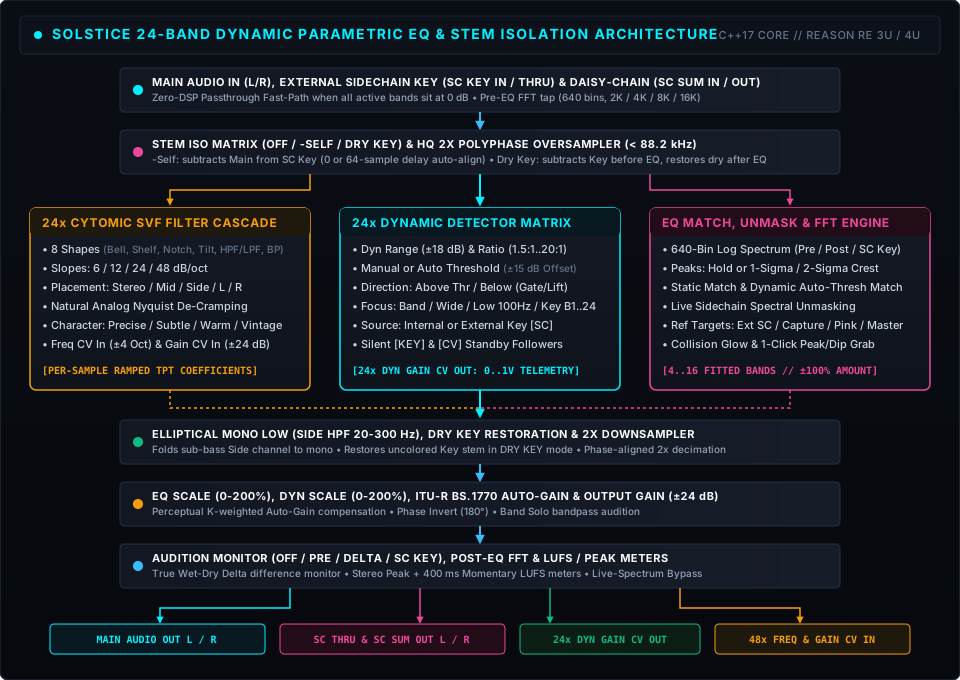
10.1 Linear Trapezoidal State Variable Filters & Natural Nyquist De-Cramping
Each band uses a 64-bit Linear Trapezoidal Integrated State Variable Filter (SVF) topology, which remains unconditionally stable under audio-rate frequency, Q, and gain modulation. For 24 dB/oct and 48 dB/oct slopes, Solstice cascades N ∈ {2, 4} matched 2nd-order SVF sections (splitting Bell, Shelf, and Tilt dB gain equally across N stages as Gstage = Gtotal / N), while 6 dB/oct engages a 1st-order trapezoidal mode.
To prevent standard bilinear-transform bandwidth cramping as fc approaches Nyquist (fs / 2) without introducing linear-phase latency, Bell, Notch, and Band-Pass filters map the analog lower half-power frequency ratio r1 through the bilinear pre-warping curve:
To eliminate zipper noise during fast dynamic modulation or parameter drags, all six state coefficients linearly interpolate sample-by-sample across the processing block.
10.2 Dynamic Envelope Ballistics, Frequency-Aware Defaults & Auto Threshold
Each active dynamic band runs a dedicated 1x-rate SVF detector filter followed by an asymmetric 1-pole ballistic follower (τatt ∈ [0.5, 250] ms, τrel ∈ [5, 1000] ms) boxcar-averaged across the 64-sample batch to reject rectified 2f ripple aliasing.
- Frequency-Aware Manual Threshold Default ([-36.0, -16.0] dB): Because musical mixes roll off at roughly -3 to -4.5 dB/oct (~ -2.4 dB/oct after constant-Q bandpass integration above 80 Hz), Solstice initializes each band’s manual threshold along the natural spectral tilt:
- Crest-Riding Auto Threshold (AUTO): Tracks the band’s long-term program floor Rauto[n] via an asymmetric slow follower (350 ms upward acquisition / 1.20 s downward release whenever EdB > -70 dBFS) and offsets the effective threshold by user sensitivity Δuser ∈ [-15, +15] dB and direction bias Δdir (-1.5 dB for Above, +1.5 dB for Below):
- 6 dB Soft Knee & Asymptotic Excursion Saturation: Given overdrive x = EdB − Teff (or Teff − EdB in Below mode) and a W = 6.0 dB parabolic soft knee xeff, instantaneous dynamic gain ΔGdyn approaches the band’s scaled dynamic range Drange asymptotically so excursion never overshoots the set range:
On High-Pass and Low-Pass bands, ΔGdyn modulates the filter’s cutoff frequency at 1 octave per 6.0 dB:
10.3 Analog Character Model (Subtle / Warm / Vintage)
When a band’s effective Character is Subtle (M = 1.0), Warm (M = 2.05), or Vintage (M = 3.65), Solstice engages three physical components per stereo channel (L/Mid vs. R/Side):
- Dual-Rate Thermal & Supply Drift + Component Tolerance: Decorrelated Left and Right stochastic processes combine a slow thermal wander (~0.6 Hz corner) and a fast power-supply/inductor ripple (~4.5 Hz corner) with per-band capacitor/resistor tolerances, soft-bounded so Frequency drifts within ±0.28% / ±0.57% / ±1.02%, Gain within ±0.085 / ±0.175 / ±0.310 dB, and Q within ±2.2% / ±4.5% / ±8.0%.
- Bandwidth-Normalized Quadrature State Saturation: Inside the filter loop, the resonant bandpass state v1 is normalized by k = 1 / Q (bp = k · v1, so peak bandpass gain at fc is 0 dB regardless of Q ∈ [0.1, 36]) and paired with its 90° quadrature partner qState = v0 − bp − 2v2:
Because bp · qState is a pure quadrature product, it generates smooth 2nd-order even harmonics with zero DC offset and zero resonant peak runaway at high Q (and is automatically zeroed on High-Pass, Low-Pass, and Notch shapes to preserve deep stopband nulls).
10.4 Adaptive Least-Squares Stem Isolation (-SELF & DRY KEY)
Both STEM ISO modes automatically test 0-sample (forward bus) vs. 64-sample (1-block Reason feedback bus) delay alignment by comparing scale-invariant least-squares explained energy (Ered = g · (2Rxy − g · Rxx) with hysteresis) and tracking per-channel stereo projection gain αL, αR ∈ [0, 2] (α = Rxy / Rxx, snapping to 1.0 within ±3% for unity buses):
- -SELF Mode: SCclean[i] = SC[i] − α · Selfaligned[i].
- DRY KEY Mode: Out[i] = EQ(Main[i] − α · Keyaligned[i]) + α · Keyaligned[i].
11. Technical Specifications & MIDI Implementation
11.1 Technical Specifications Summary
| Specification | Value / Range |
|---|---|
| Parametric & Dynamic Bands | 24 independent bands (Bands 1 to 24), all supporting static EQ, dynamic EQ, Analog Character, and rear CV I/O |
| Filter Topology | 64-bit Linear Trapezoidal State Variable Filter with lower-edge Nyquist bandwidth de-cramping and per-sample coefficient ramping |
| Filter Shapes (8 per Band) | Bell, Low Shelf, High Shelf, Notch, Tilt Shelf, High-Pass, Low-Pass, Band-Pass |
| Filter Slopes (All Shapes) | 6 dB/oct (1st-order), 12 dB/oct (2nd-order), 24 dB/oct (4th-order), 48 dB/oct (8th-order) |
| Stereo Placement (5 per Band) | Stereo (L+R), Mid Only, Side Only, Left Only, Right Only |
| Static & Dynamic Gain Range | Static Gain: ±24.0 dB (±48 dB at 200% EQ Scale); Dynamic Range: ±18.0 dB (±36 dB at 200% Dyn Scale) |
| Dynamic Ballistics & Modes | Attack: 0.5 to 250 ms; Release: 5 to 1000 ms; Ratio: 1.5:1 to 20.0:1 (6 dB soft knee); Direction: Above Threshold or Below (Gate/Lift) |
| Threshold Modes | Manual (-60.0 to 0.0 dBFS, frequency-sloped defaults -16 to -36 dB) or Auto (±15.0 dB crest sensitivity offset) |
| Detector Focus (27 per Band) | Band Focus, Wideband, Low 100Hz, or cross-band Key: Band 1 to 24 (with Internal or External Sidechain source) |
| Analog Character Modes | Precise (bit-exact 0% extra CPU), Subtle, Warm, Vintage (global setting + per-band override) |
| EQ Match & Unmask Engine | Static EQ, Dyn Auto, and SC Unmask (4 to 16 fitted bands, -100% to +100% amount, Detail/Medium/Broad smoothing, 7 reference sources) |
| Stem Isolation (STEM ISO) | Off, -Self (Mix-Minus self-cancellation), Dry Key (in-place composite bus stem isolator), automatic 0/64-sample delay alignment |
| Elliptical Mono Low Filter | 20.0 to 300 Hz 12 dB/oct Butterworth Side-channel High-Pass (Off at full CCW) |
| Spectrum Analyzer | 640-bin logarithmic display (Pre, Post, SC Key), 2K / 4K / 8K / 16K FFT, Off / Peaks / Inf / 1σ-2σ Crest ribbon |
| Oversampling (HQ 2X) | 2x polyphase half-band oversampler below 88.2 kHz (automatic 0%-CPU no-op at 88.2 kHz and above) |
| Rear Panel Connectivity | 12 Audio jacks (Main In/Out, SC Key In, SC Thru, SC Sum In/Out) + 72 CV jacks (24x Freq CV In, 24x Gain CV In, 24x Dyn Gain CV Out) |
| Supported Sample Rates | 44.1 kHz to 192.0 kHz |
11.2 Reason Remote & MIDI CC Implementation Chart
Because the Reason Rack Extension format provides 94 MIDI CC / Combinator modulation slots total, Solstice assigns:
- 10 CCs (CC 12 to 21) to the global and drawer master controls,
- 72 CCs (3 per band × 24 bands) to Bypass (On/Off), Frequency, and Gain across all 24 bands, and
- 12 CCs (CC 108 to 119) to Q and Dynamic Range on primary Bands 1 to 6.
(All remaining per-band parameters remain accessible via Reason Remote control surfaces, rack automation lanes, and the rear 72-jack CV matrix.)
| Parameter | Function | MIDI CC | Range / Options | Default |
|---|---|---|---|---|
| Output Gain | Master Output Gain | CC 12 | -24.0 to +24.0 dB | 0.0 dB |
| EQ Scale | Global Static EQ Scale | CC 13 | 0% to 200% | 100% |
| Dyn Scale | Global Dynamic Scale | CC 14 | 0% to 200% | 100% |
| Mono Low Enable | Side High-Pass Enable | CC 15 | Off, On | Off |
| Mono Low Cutoff | Side High-Pass Cutoff | CC 16 | Off / 20.0 to 300 Hz | Off |
| Subtract Self | Mix-Minus (-Self Toggle) | CC 17 | Off, On | Off |
| Auto Gain | Perceptual Auto-Gain | CC 18 | Off, On | Off |
| Stem Iso Mode | STEM ISO Mode | CC 19 | Off, -Self, Dry Key | Off |
| Audition | Audition Monitor Mode | CC 20 | Off, Pre, Delta, SC Key | Off |
| Polarity | Output Polarity Invert (180°) | CC 21 | Normal (0°), Invert (180°) | Normal |
| Global Character | Global Analog Character | Remote | Precise, Subtle, Warm, Vintage | Precise |
| HQ 2X OS | 2x Polyphase Oversampling | Remote | Off, On | On |
| Pre / Post / SC Key | Analyzer Trace Toggles | Remote | Off, On | Post On |
| Peaks Mode | Analyzer Peak Mode | Remote | Off, Peaks, Inf, Crest | Peaks |
| Analyzer Slope | Analyzer Visual Slope | Remote | 0.0, 3.0, PERC, 4.5, 6.0 dB/oct | 0.0 dB/oct |
| Analyzer Resolution | FFT Window Size | Remote | 2K, 4K, 8K, 16K | 4K |
| Analyzer View | Analyzer Channel View | Remote | Stereo, Mid, Side, Left, Right | Stereo |
| Display Range | Vertical EQ Gain Range | Remote | ±12 dB, ±24 dB, ±36 dB | ±24 dB |
| Bands 1 to 3 Bypass / Freq / Gain | Band 1 to 3 On/Off, Freq, Gain | CC 22 to 30 | On/Off, 20 Hz to 20 kHz, ±24 dB | 0 dB |
| Band 4 Bypass / Freq / Gain | Band 4 On/Off, Freq, Gain | CC 31, 39, 40 | On/Off, 20 Hz to 20 kHz, ±24 dB | 2.50 kHz, 0 dB |
| Bands 5 to 11 Bypass / Freq / Gain | Band 5 to 11 On/Off, Freq, Gain | CC 41 to 61 | On/Off, 20 Hz to 20 kHz, ±24 dB | 0 dB |
| Band 12 Bypass / Freq / Gain | Band 12 On/Off, Freq, Gain | CC 62, 63, 65 | On/Off, 20 Hz to 20 kHz, ±24 dB | 14.0 kHz, 0 dB |
| Bands 13 to 22 Bypass / Freq / Gain | Band 13 to 22 On/Off, Freq, Gain | CC 66 to 95 | On/Off, 20 Hz to 20 kHz, ±24 dB | 0 dB |
| Bands 23 to 24 Bypass / Freq / Gain | Band 23 to 24 On/Off, Freq, Gain | CC 102 to 107 | On/Off, 20 Hz to 20 kHz, ±24 dB | 0 dB |
| Bands 1 to 6 Q & Dynamic Range | Band 1 to 6 Q & Dynamic Range | CC 108 to 119 | Q: 0.1 to 36.0, Dyn: ±18.0 dB | 0.71/1.0, 0 dB |
| Bands 1 to 24 Shape / Slope / Placement | Per-Band Shape, Slope, Placement | Remote | 8 Shapes, 6 to 48 dB/oct, 5 Placements | Bell, 12 dB, Stereo |
| Bands 1 to 24 Threshold & Auto Mode | Per-Band Threshold & Auto Mode | Remote | -60..0 dB (±15 dB Auto), Man/Auto | Freq-sloped, Man |
| Bands 1 to 24 Attack / Release / Ratio | Per-Band Dynamic Ballistics | Remote | 0.5 to 250 ms, 5 to 1000 ms, 1.5 to 20:1 | 3.5 ms, 65 ms, 4:1 |
| Bands 1 to 24 Direction / Detector / SC | Per-Band Trigger & Detector | Remote | Above/Below × (Band/Wide/Low/B1 to 24), Int/Ext | Above Band, Int |
| Bands 1 to 24 Character | Per-Band Analog Character | Remote | Default, Precise, Subtle, Warm, Vintage | Default |