
Kalibrus Noise & Spectral Reference: Operation Manual & Studio Reference Guide
Device Classification: Instrument / Utility (Synth, CV Source, Misc)
Rack Format: 2U Full-Width (collapsible to compact folded strip)
Supported Platforms: Reason 10.1+ (macOS Intel & Apple Silicon Universal, Windows 64-bit)
Author: Edward Boraas
1. System Overview & Engineering Philosophy
Kalibrus is a calibrated laboratory-grade noise generator, acoustic measurement source, playable expressive synthesizer voice, and modular CV modulation engine for the Reason Rack.
Standard DAW noise generators often fall into simple utility oscillators that constantly drain CPU cycles or raw synthesizer noise stages that lack calibrated frequency slopes, standardized metering, and acoustic alignment controls.
Kalibrus provides a three-in-one architecture:
- Calibrated Laboratory Reference: Generates mathematically pure Pink (−3 dB/oct), White (0 dB/oct), and Brown (−6 dB/oct) spectral slopes normalized to −18.00 dBFS True RMS. Paired with 4th-order (24 dB/oct) Butterworth filter sweeps, Mid/Side stereo width processing, and true-power RMS metering, it serves as an acoustic reference for monitor SPL alignment, pink-noise mix balancing, phase verification, and subwoofer crossover tuning.
- Modular Synthesizer Voice: Functions as a fully playable instrument with 1V/oct pitch tracking, keyboard/sequencer gate triggering, dynamic velocity sensitivity, mod-wheel bandwidth narrowing, external envelope modulation, and 35 factory presets spanning vintage snares, modular percussion, and atmospheric textures.
- Modular CV Modulation & Randomization Source: Supplies continuous bipolar analog-style fluctuating voltage (Noise CV Out) for wow/flutter, filter drift, and tape instability, alongside gate-clocked stepped random voltages (Sample & Hold CV Out) for generative sequencing, pitch quantization, and parameter modulation across external rack devices.
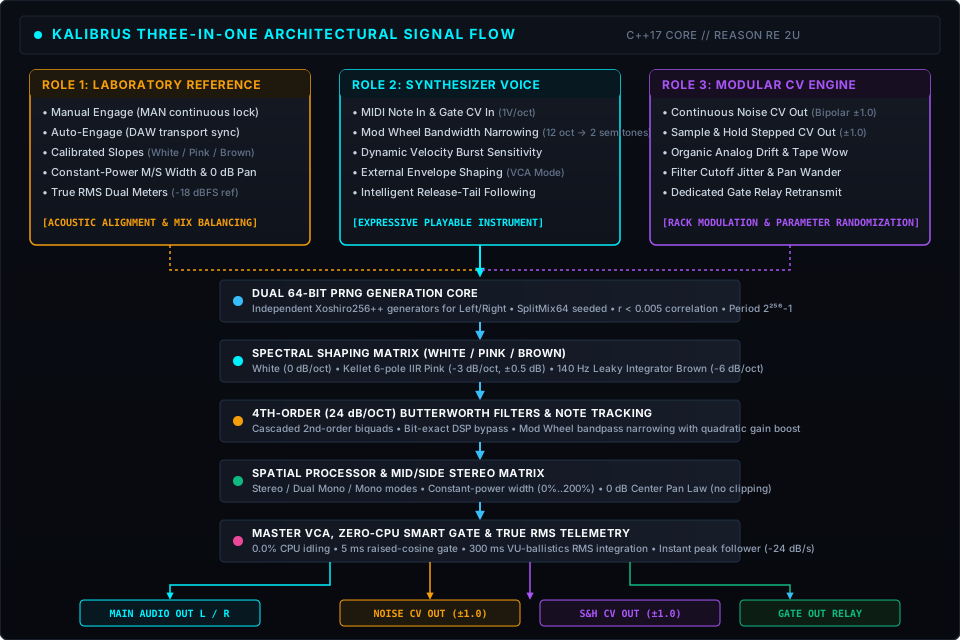
The 64-Bit PRNG Core
At the center of Kalibrus is a dual-instance Xoshiro256++ pseudo-random number generator operating on 256 bits of internal state (4 × uint64_t). Seeded through an address-hash SplitMix64 pipeline, each instance generates completely uncorrelated stereo streams (r < 0.005) with a period of 2²⁵⁶ − 1 samples, ensuring zero audible looping or cross-channel phasing.
Smart Standby Gating (Zero-CPU Idling)
A dedicated voice gate manages internal processing:
- Silent Standby: When ENGAGE (MAN) is off, DAW transport is stopped, and no MIDI notes or CV gates are incoming, Kalibrus operates at 0.0% CPU idling. Audio buffers are clamped to zero, and the PRNG engine sleeps.
- Click-Free Activation: When triggered by a MIDI key or CV gate, a 5 ms raised-cosine envelope opens the voice gate smoothly without transient clicks. Manual engage transitions apply a 50 ms raised-cosine fade to protect monitors.
- Graceful Decay: When releasing a note or returning to standby, audio decays smoothly via envelope release or soft fade, while meters track the falloff with standard 300 ms RMS integration and a −24 dB/s peak follower.
2. 2U Front Panel Guided Tour
The 2U unfolded front panel is divided into four functional bays, framed by Canadian Robertson screws and 19-inch rack mounting rails.

Bay 1: Identity & Transport Engagement
1. Console Labeling Tape
A textured vertical console tape strip mounted on the left rack ear. Double-clicking this area in Reason lets you write custom grease-pencil rack labels directly onto the hardware faceplate.
2. Patch Name Display
Displays the active preset name in high-contrast red acrylic text. Flanked by native Reason patch browsing buttons (▲ previous patch, ▼ next patch, folder browser, and disk save icon).
3. Manual Engage Button (MAN)
- Function: Master continuous activation switch.
- Operation: Illuminated push-button engraved with
MAN. Clicking this button locks the voice gate permanently open, producing continuous noise regardless of MIDI input or transport status. Ideal for continuous acoustic measurement and studio monitor calibration. - Default: Disarmed (
Off).
4. Auto Engage Button (AUTO)
- Function: DAW transport sync toggle.
- Operation: Illuminated push-button engraved with
AUTO. When active, Kalibrus automatically engages noise generation the instant the DAW transport starts playing, and immediately disengages into silent standby when transport stops. - Primary Use: Adding automated room tone, vinyl beds, or tape-band noise floors to mixes without leaving background noise running when playback stops.
- Default: Disarmed (
Off).
5. Note On Jewel Lamp (NOTE)
- Function: Gate and velocity activity monitor.
- Operation: Cyan jewel lamp illuminating in real-time whenever a MIDI note or rear-panel CV gate signal is active, confirming that the internal voice gate is open.
Bay 2: Spectral Filter Bank
1. Noise Color Selector
A 3-position vertical selector switch choosing the mathematical spectral slope:
- White (0 dB/oct): Equal energy per Hertz. Flat, full-spectrum distribution spanning 20 Hz … 20 kHz. Normalized to −18.00 dBFS True RMS. Essential for frequency-response testing, transient synthesis (snare/clap layers), and microphone calibration.
- Pink (−3 dB/oct): Equal energy per octave. The acoustic measurement standard for psychoacoustic human hearing balance. Implemented via Paul Kellet’s parallel filter bank (6 first-order IIR sections + 1 FIR correction term) accurate to within ±0.5 dB of ideal 1/f roll-off across the audible band, calibrated to −18.00 dBFS True RMS.
- Brown (−6 dB/oct): Equal energy per double-octave (1/f² Brownian motion). Built with a 140 Hz corner leaky integrator, delivering warm, low-frequency weight with natural high-frequency roll-off, normalized to −18.00 dBFS True RMS.
2. High-Pass Filter (HPF)
- Topology: 4th-order (24 dB/oct) cascaded Butterworth biquad filter (Q1 = 0.5412, Q2 = 1.3066).
- Range: 20 Hz … 20 kHz across a continuous logarithmic sweep.
- Bypass Detent: Turned fully counter-clockwise (20 Hz), the filter enters bit-exact DSP bypass (host tooltip displays
"Off"), saving processing cycles and ensuring zero phase distortion.
3. Low-Pass Filter (LPF)
- Topology: 4th-order (24 dB/oct) cascaded Butterworth biquad filter (Q1 = 0.5412, Q2 = 1.3066).
- Range: 20 Hz … 20 kHz across a continuous logarithmic sweep.
- Bypass Detent: Turned fully clockwise (20 kHz), the filter enters bit-exact DSP bypass (host tooltip displays
"Off").
4. Mod Wheel Note-Tracking Bandwidth Control
When playing Kalibrus from a MIDI keyboard or sequencer with a note active:
- Mod Wheel at Zero (Default): Full manual filter control. The front-panel HPF and LPF knobs dictate cutoffs.
- Mod Wheel Advanced (> 0): Dynamically narrows the filter bank into a resonant bandpass tracking the pitch of the played note (1V/oct). Bandwidth scales smoothly from 12 octaves down to 2 semitones (w(m) = 121 − 2m octaves).
- Quadratic Gain Compensation: As bandwidth narrows toward high mod wheel settings, Kalibrus automatically applies an internal quadratic gain boost (up to +6.8 dB at full mod wheel, 1.0 + 1.2 · m2) to compensate for acoustic energy loss, keeping perceived loudness consistent.
Bay 3: Spatial Processor & Mid/Side Matrix
1. Routing Mode Switch
A 3-position vertical switch governing stereo topology:
- Stereo: Default operation. Two independent, completely uncorrelated PRNG noise streams feed the left and right audio channels through the Mid/Side matrix.
- Dual Mono: Isolates the left and right channels into two independent mono noise sources. Completely bypasses the Mid/Side width stage. Essential for bench-testing hardware consoles, dual-channel audio interfaces, and stereo channel tracking without inter-channel phase interaction.
- Mono: Sums the noise engine into an identical in-phase signal on both outputs ((L + R) / √2). Essential for checking loudspeaker phase alignment and testing mix summing for mono cancellation.
2. Stereo Width Dial
- Range: 0% … 200% (0.0 … 2.0 factor).
- 0% (Mono): Collapses stereo information entirely to the Mid channel.
- 100% (True Stereo): Unaltered natural stereo separation between the dual noise generators.
- 200% (Super-Wide): Boosts Side energy while reducing Mid energy for wide atmospheric stereo beds.
- Equal-Power Loudness Normalization: The matrix uses an active 1 / √(1 + w²) power curve, ensuring that widening or narrowing the stereo field doesn’t cause overall volume to drift.
3. Panoramic Balance Dial
- Range: 100% Left … Center … 100% Right.
- Pan Law: True 0 dB Center Pan Law. Panning reduces the opposite channel without boosting the focused channel, preventing signal clipping at extremes.
Bay 4: Master Output & Telemetry
1. Noise Level Dial
- Range: −∞ dB … +18 dB across a precision 65-frame dial.
- Detent: 12 o’clock center detent represents calibrated nominal 0.0 dB output gain (cubic law).
2. True-Power RMS LED Ladder Meters
- Channels: Dual independent Left and Right ladders (24 segmented acrylic LED bars per channel).
- Ballistics: Fast true-power RMS integration matching professional studio PPM / VU ballistics (300 ms time constant), backed by an instantaneous peak follower and graceful −24 dB/s decay.
- Calibrated Scale: Segment thresholds align dead-center to faceplate tick marks:
- Green: −48 dBFS … −18 dBFS (Standard headroom zone)
- Cyan/Amber: −12 dBFS … −3 dBFS (Reference operating ceiling)
- Red: 0 dBFS (Digital Full Scale ceiling)
3. Rear Panel & CV Modulation Matrix
Pressing Tab flips the Reason rack to expose the rear panel.

Bay 1: AC Mains Power Inlet
- AC Power Inlet: Studio-standard C14 IEC power socket with heavy-gauge cabling. (Studio field repairs can be unpredictable; handle cabling with care).
Bay 2: Audio Inputs (Passthrough & Summing)
- Left & Right TRS Sockets: Connect external synthesizer tracks, drum loops, or full mix stems.
- Intelligent Auto-Routing:
- Standby Mode: When Kalibrus is disengaged and idle, external audio passes through bit-identically (0.0 dB gain, zero CPU overhead).
- Engaged Mode: Incoming audio linearly sums (1:1) with the internal calibrated noise reference, allowing you to inject subtle dither, tape hiss, or diagnostic noise directly onto live audio channels.
Bay 3: Sequencer Control & Modulation
- Note CV In: Accepts standard 1V/oct pitch control from Reason sequencers, Players (Quad Note Generator, Bassline Generator), or Matrix patterns to steer bandpass center frequency.
- Gate CV In: Accepts standard gate pulses (threshold > 0.02) to trigger the internal voice gate.
- Mod Wheel CV In (Bandwidth / Note Q): Accepts external continuous CV (0.0 … 1.0) mirroring mod wheel bandwidth narrowing (0V = wide open, +1V = 2 semitones resonant bandpass).
- Gate Out (MIDI & CV Relay): Retransmits incoming MIDI and CV gate pulses out to downstream rack devices. This lets Kalibrus trigger external envelope generators (such as Sweeper, ECF-42, Pulveriser, or Complex-1) in perfect synchronicity with keyboard performance.
Bay 4: Filter CV Modulation
- HPF CV In & Attenuverter: Modulates High-Pass cutoff frequency. Bipolar trim pot controls depth from −100% (inverted) to +100% (±10 octaves sweep).
- LPF CV In & Attenuverter: Modulates Low-Pass cutoff frequency with bipolar trimming (±10 octaves sweep).
Bay 5: Level CV Modulation & Release Following
- Level CV In: Controls master VCA level via external modulation sources (envelopes, LFOs, Matrix curves).
- Mode Switch:
VCA / ENV(Down Position - Default): Configured for unipolar envelopes (0V … 1V). At 0V, output is silent; at +1V, volume reaches the front-panel Noise Level ceiling.TREM / LFO(Up Position): Configured for bipolar LFO modulation (±1V). Provides zero-clipping linear amplitude modulation centered at nominal level.
- Level Trim Knob:
- Fully Clockwise (
+): 100% envelope depth. - Center (12 o’clock): Modulation bypassed (in VCA mode, holds output silent).
- Counter-Clockwise (
-): Inverts modulation, applying cubic sidechain ducking ((1.0 - cv * |trim|)^3) to duck noise volume on incoming kick/snare CV hits.
- Fully Clockwise (
- Intelligent Release-Tail Following: When playing Kalibrus with ENGAGE disarmed, releasing a key would normally clamp the voice shut. In
VCA / ENVmode, Kalibrus actively monitors the decaying tail of your external envelope on Level CV In. As long as voltage remains non-zero (levelFactor > 0.002), Kalibrus holds the voice gate open, letting long reverb/envelope tails ring out naturally without being cut short.
Bay 6: CV Output Generators
- Noise CV Out: Emits continuous bipolar [−1.0 … +1.0] random voltage derived post-Butterworth filter bank. Provides an organic, non-repeating LFO voltage whose rate and smoothness are directly sculpted by the front-panel HPF and LPF dials.
- Gate-Triggered S&H CV Out: Emits a newly latched, stepped bipolar [−1.0 … +1.0] random voltage on every note gate. Uncorrelated with previous notes; ideal for driving external synthesizer filter cutoffs, panning, or modular patch targets.
4. Folded Front Panel (Mastering & Calibration Strip)
Clicking the fold triangle in the upper-left rack ear collapses Kalibrus to a compact folded strip.

The compact folded view provides full operational access without occupying rack space:
- Bay 1 (Transport & Presets): Mini patch LCD with steppers, Note indicator lamp, and tactile
MAN/AUTObuttons. - Bay 2 (Noise & Filters): Radio buttons for White (
WHT), Pink (PNK), and Brown (BRN) noise, alongside dedicated mini rotary dials for HPF and LPF cutoffs. - Bay 3 (Spatial Processor): Buttons for
MONO,STR(Stereo), andDUALrouting, paired with mini Width and Balance dials. - Bay 4 (Master & Telemetry): Mini Noise Level dial and a high-density 24-segment horizontal LED stereo meter.
5. Studio Engineering & Calibration Workflows
Protocol A: Studio Monitor Alignment (83 dB(C) SPL Standard)
To set an accurate, repeatable monitoring reference in your control room:
- Load Patch: Instantiate Kalibrus and select
01 Reference & Calibration/True RMS Pink Reference (-18 dBFS).repatch(orQuick - Pink Noise). - Set Monitoring Chain: Set your audio interface and monitor controller to their nominal operating position (e.g., Unity 0 dB).
- Position SPL Meter: Place a calibrated Sound Pressure Level (SPL) meter at your primary listening position (mix sweet spot), pointed between the monitors at ear height. Set the meter to C-Weighted, Slow Response.
- Engage Left Speaker:
- On Kalibrus, set Pan to full Left (100% L).
- Click MAN to engage continuous pink noise.
- Adjust your left studio monitor’s physical gain trim until the SPL meter reads exactly:
- 83 dB(C) SPL (Large control rooms, > 150 m³)
- 79 dB(C) SPL (Mid-sized project studios, 80 m³ … 150 m³)
- 74 dB(C) SPL (Small bedrooms / home studios, < 80 m³)
- Engage Right Speaker:
- Pan Kalibrus to full Right (100% R).
- Adjust the right studio monitor until it reads the exact same target SPL.
- Verify Stereo Sum:
- Pan Kalibrus back to Center (0 dB). Combined SPL should read +3 dB higher (e.g., 86 dB(C) SPL).
- Disengage MAN. Your listening room is now calibrated to international acoustic standards.
Protocol B: The Pink Noise Mix Balancing Technique
Pink noise mix referencing provides a reliable acoustic baseline for establishing initial track balance across an arrangement:
- Insert Kalibrus: Insert Kalibrus on an unused channel or utility bus. Load
02 Mixing & Diagnostics/Pink Noise Mix Balancing (-18dB CAL).repatch. - Engage Noise: Click MAN so pink noise plays continuously at −18 dBFS.
- Solo Individual Tracks: Mute all tracks, then solo your kick drum alongside Kalibrus.
- Fader Threshold Alignment:
- Pull the kick drum fader down to −∞.
- Slowly raise the fader until the kick drum just barely emerges from the blanket of pink noise. The moment it becomes distinguishable, stop.
- Repeat Across All Tracks:
- Unsolo the kick and solo the snare alongside Kalibrus. Raise its fader until it just peeks through the noise.
- Repeat for bass, lead vocals, guitars, synths, and background vocals one at a time.
- Mute Kalibrus & Unmute All:
- Disengage MAN on Kalibrus.
- Listen to the entire mix without noise. Track volumes sit in a remarkably coherent relationship with natural vocal clarity and clean headroom.
Protocol C: Subwoofer Crossover & Room Mode Detection
Room acoustic modes cause severe bass peaks and nulls due to standing waves:
- Load
03 Acoustic Probes/Sub-Bass Room Mode Probe (40Hz - 100Hz).repatch. - Ensure routing is set to Mono and click MAN.
- Slowly sweep the HPF knob upward from 20 Hz to 120 Hz.
- Walk around your mixing room. As you sweep through frequencies:
- Room Modes (Peaks): Frequencies where the bass suddenly booms or rattles room surfaces indicate resonant room modes.
- Boundary Nulls: Positions where bass completely disappears indicate destructive phase cancellation from rear wall reflections.
- Note these frequencies; use acoustic bass traps or room correction EQ to tame the identified problematic frequencies.
6. Sound Design & Layering Recipes
Recipe 1: Keyed Snare & Clap Reinforcement
- Objective: Add acoustic crack and transient sizzle to an electronic snare or synthesized clap.
- Patch:
05 Performance & Layering/Snare & Clap Noise Layer (Keyed Burst). - Routing:
- Route your drum sequencer’s snare gate into Kalibrus’s rear Gate In.
- Set Noise Color to White.
- Set HPF to 1.2 kHz to filter out low-end mud.
- Leave ENGAGE disarmed. Every snare hit triggers a tight, snappy white noise burst that layers under your drum sample.
Recipe 2: Sub-Bass Air & Low-End Weight
- Objective: Thicken an 808 or synth bassline with subterranean foundation.
- Patch:
05 Performance & Layering/Sub-Bass Air Thump (Keyed Weight). - Routing:
- Split your bass track’s MIDI to Kalibrus using a Combinator or Parallel Track.
- Set Noise Color to Brown.
- Set LPF to 90 Hz and HPF to 25 Hz.
- Set Routing to Dual Mono or Mono.
- The Brownian noise generator follows the pitch contour of your bassline, adding warm analog weight without high-frequency fizz.
Recipe 3: Ambient Vinyl Bed & Tape Hiss
- Objective: Inject vintage Lo-Fi character that automatically stops when the song stops.
- Patch:
04 Textures & Modulation/Tape-Band Noise Floor (-42dB). - Setup:
- Set Noise Level to −42 dB.
- Press AUTO (Auto Engage).
- Start playback in Reason. Kalibrus automatically provides a subtle tape-band noise bed throughout the arrangement, and instantly silences into zero-CPU standby the moment you hit Stop.
7. Combinator 2 Integration & Advanced Rigs
Kalibrus pairs natively with Reason’s Combinator 2 container for complex multi-device performance rigs.
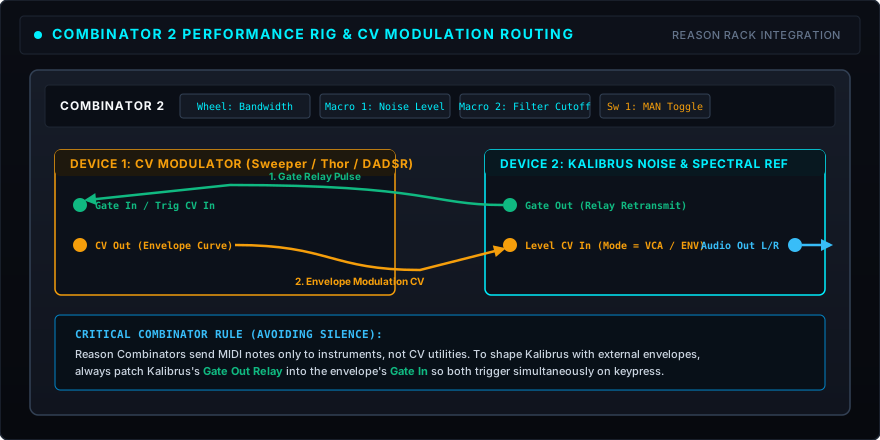
Latching Keyswitch Configurations
In complex sound design patches where you want momentary or latching keyswitching:
- The Approach: Use Combinator 2’s target filtering. Map a Combinator 2 momentary button to Kalibrus’s Manual Engage, or route a Combinator CV Run output directly into Kalibrus’s rear Level CV In with Mode set to
VCA / ENV. Because Kalibrus features intelligent release-following DSP, releasing the button or keyswitch guarantees a clean fade out without stuck voices or buffer hanging.
8. Technical Specifications & Reference
Audio Specifications
| Parameter | Value | Details |
|---|---|---|
| Product Identifier | ca.boraas.Kalibrus | Reason Studios RE Article Identifier |
| Internal Processing | 32-bit IEEE 754 Floating-Point | Pure C++17 core, zero heap allocations |
| Supported Host Sample Rates | 44.1 kHz … 192 kHz | Native sample-rate tracking |
| PRNG Core | Dual Xoshiro256++ 64-bit | 2²⁵⁶ − 1 period, r < 0.005 cross-channel correlation |
| Reference Level | −18.00 dBFS True RMS | Calibrated unity gain at 12 o’clock noon (cubic law) |
| Filter Cascades | 24 dB/oct (4th-order) Butterworth | Cascaded biquads with bit-exact bypass at extremes |
| Filter Frequency Range | 20 Hz … 20 kHz | Continuous logarithmic sweep |
| Stereo Width Range | 0% … 200% | Constant-power normalized M/S matrix |
| Output Gain Range | −∞ dB … +18 dB | Precision 65-frame dial, 0 dB center detent |
| Meter Scale | −48 dBFS … 0 dBFS | True-power RMS integration (300 ms) with peak follower |
| Idling CPU Footprint | 0.0% | Smart Standby gating during silence |
CV Modulation Specifications
| CV Socket | Polarity / Range | Function |
|---|---|---|
| Note CV In | 0.0 … 1.0 (1V/oct, Notes 0–127) | Modulates center frequency of pitch-tracked bandpass |
| Gate CV In | 0.0V … 1.0V (Threshold > 0.02) | Triggers internal voice gate (5 ms raised-cosine) |
| Mod Wheel CV In (Bandwidth) | 0.0V … 1.0V (Unipolar) | Modulates filter Q / bandwidth (0V = 12 oct, +1V = 2 semitones) |
| Gate Out (MIDI & CV Relay) | 0.0V / 1.0V | Mirrors active keyboard notes and rear Gate CV In |
| HPF CV In | Bipolar (−1.0 … +1.0, ±100%) | Modulates High-Pass cutoff frequency (±10 octaves sweep) |
| LPF CV In | Bipolar (−1.0 … +1.0, ±100%) | Modulates Low-Pass cutoff frequency (±10 octaves sweep) |
| Level CV In (VCA) | Unipolar (0.0V … 1.0V) | Modulates master VCA amplitude (0V = silence) |
| Level CV In (TREM) | Bipolar (−1.0V … +1.0V) | Modulates master VCA via linear AM tremolo |
| Noise CV Out | Bipolar (−1.0 … +1.0) | Emits continuous filtered random voltage post-filters |
| Sample & Hold CV Out | Bipolar (−1.0 … +1.0) | Emits gate-latched stepped random voltage on keypress |
Reason Remote Control Map (Edward Boraas Kalibrus.txt)
All front and rear panel parameters are fully mapped for hardware controllers using Reason’s Remote protocol:
Noise Level: Master Output VolumeHPF Freq: High-Pass Filter CutoffLPF Freq: Low-Pass Filter CutoffNoise Type: 3-way Noise Color (White, Pink, Brown)Channel Mode: Stereo, Dual Mono, MonoStereo Width: Mid/Side WidthBalance: Panoramic PanManual: Manual Engage toggle (MAN)Auto: Auto Engage transport sync (AUTO)Level CV Mode: VCA vs Tremolo selectorHPF CV Trim,LPF CV Trim,Level CV Trim: Hardware modulation depths
🌐 External Links
- Edward Boraas Product Page: https://audio.boraas.ca/devices/kalibrus/
- Reason Studios Shop: Kalibrus: https://www.reasonstudios.com/shop/rack-extension/kalibrus/
- ReasonTalk Community Discussion: https://forum.reasontalk.com