
Kalibrus Quick Start & Modulation Guide
Kalibrus serves three primary roles in the Reason rack:
- Precision Laboratory Reference: Calibrated continuous acoustic testing, monitor alignment, frequency balancing, and pink/white/brown noise reference.
- Modular Synthesizer Voice: A playable, note-tracked, envelope-shaped noise oscillator with 4th-order Butterworth filters, mid/side stereo imaging, and dynamic velocity sensitivity.
- Modular CV Modulation Source: Continuous analog-style fluctuating Noise CV Out and gate-triggered Sample & Hold (S&H) Stepped CV Out for driving external filters, generative melodies, and rack parameter randomization.
This guide explains how to modulate Kalibrus with external envelope generators, sequencers, and modulation effects (both inside and outside Combinators) while using its intelligent standby voice gating, release-following DSP, and modular CV routing matrix.
1. Core Architecture: Standby Gating & CV Engine
Before patching, it helps to understand how Kalibrus manages signal flow and CPU idling under the hood:
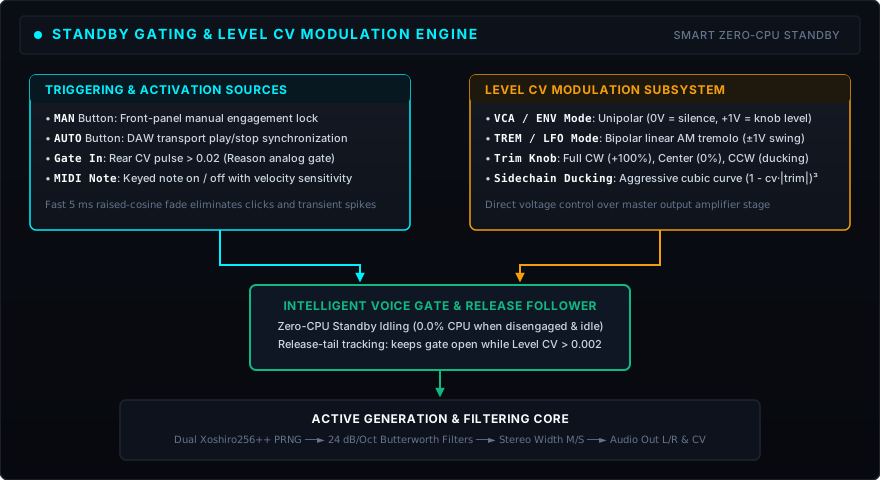
The Smart Standby Gate (Zero CPU Idling)
To prevent constant CPU drain and unwanted noise bleed during playback stops, Kalibrus features an automatic standby gate:
- Disengaged State: When the front-panel ENGAGE (MAN) button is off and the DAW transport is stopped, the output stage is completely gated (0.0% CPU, absolute silence).
- Keyboard / Sequencer Note Triggering: Pressing a MIDI key on Kalibrus’s track or sending a pulse into rear Gate In opens the voice gate with a de-clicked 5 ms raised-cosine fade.
- Continuous Generation: Pressing ENGAGE (or using AUTO transport sync) holds the voice gate open continuously.
Level CV Modes (Rear Bay 5)
A 2-way toggle switch on the back panel defines how incoming voltage on Level CV In controls volume:
VCA / ENV(Down Position - Default): Configured for unipolar envelopes (0V … 1V). At 0V, the output is completely silent. At +1V, volume reaches the ceiling dialed on the front-panel Noise Level knob.TREM / LFO(Up Position): Configured for bipolar LFO modulation (−1V … +1V). At 0V, output sits at nominal knob gain; the incoming signal provides symmetric linear amplitude modulation without runaway clipping.
Level CV Trim Knob
Located right next to the Mode switch:
- Full Clockwise (
+, +100% - Default): Full modulation depth. - Center Detent (12 o’clock, 0%): Zero modulation depth. (Note: If centered while in VCA mode, Level CV will hold the device in total silence).
- Negative Counter-Clockwise (
-): Enables punchy cubic sidechain ducking ((1.0 - cvVal * |trim|)^3), pulling nominal level down to silence at envelope peaks.
Intelligent Release-Tail Following
When playing Kalibrus as an instrument with ENGAGE off, releasing a key would normally clamp the voice shut. In VCA / ENV mode, Kalibrus’s DSP tracks the decaying tail of your external envelope on Level CV In. As long as the envelope voltage remains non-zero (levelFactor > 0.002), Kalibrus holds its internal voice gate open, letting long release tails ring out cleanly without abrupt cutoffs.
2. Walkthrough 1: Envelope Shaping with Sweeper (Stock Reason Device)
You can build a fully visual envelope-controlled noise generator using Reason’s built-in Sweeper Modulation Effect:
- Create Kalibrus: Add a Kalibrus device on its own track with keyboard input directed to it.
- Add Sweeper: Insert Sweeper directly after Kalibrus using the default
"Basic Phasing"patch.- (At this stage, holding a note or pressing MAN produces an ambient wind effect as Sweeper’s flanger processes the noise).
- Connect Envelope CV: Flip the rack (
Tab) and wire Sweeper’s Fol/Env CV Out into Kalibrus’s Level CV In.- Verify that Kalibrus’s Level CV Mode switch is in the default VCA / ENV position, with Trim fully clockwise to
+. - If you press MAN on Kalibrus now, you’ll hear silence because Sweeper holds Level CV at 0V between cycles.
- Verify that Kalibrus’s Level CV Mode switch is in the default VCA / ENV position, with Trim fully clockwise to
- Wire the Gate Trigger: Connect Kalibrus’s Gate Out relay socket to Sweeper’s rear Trig Envelope input.
- When you press a key or feed Gate In, Kalibrus triggers Sweeper’s envelope cycle.
- When you play a note, noise level follows Sweeper’s envelope while passing through Sweeper’s flanger.
- Isolate the Envelope (Bypass Flanging):
- To use Sweeper purely as a CV envelope generator without colouring the audio, set Sweeper to Bypass mode, or wire Kalibrus’s Audio Out L/R directly to your mixer/master section.
- Pressing a note on your keyboard now produces clean noise shaped strictly by Sweeper’s visual envelope curve.
Pro Tip (Rolling Ocean Waves): Connect Sweeper’s LFO CV Out instead of Fol/Env into Kalibrus’s Level CV In. Because VCA mode clamps all negative LFO swing to silence, Kalibrus produces an organic, undulating surf sound.
3. Walkthrough 2: Dedicated CV Envelopes (CV DADSR, Thor, Pulsar)
Dedicated envelope utilities like Warp Factor Audio’s free CV DADSR Envelope Rack Extension integrate directly:
- Trigger Routing: Cable Kalibrus’s rear Gate Out socket to CV DADSR’s rear CV In (gate trigger input).
- Modulation Routing: Cable CV DADSR’s Normal Out to Kalibrus’s Level CV In.
- Faceplate Settings:
- Ensure Kalibrus’s rear Mode switch is set to VCA / ENV.
- Ensure Kalibrus’s rear Trim knob is fully clockwise (
+). - Adjust Attack, Decay, Sustain, and Release on CV DADSR.
- Play: Play notes from your MIDI keyboard or sequencer. Kalibrus tracks keyboard velocity, opens on key-down, and sustains/releases cleanly according to the DADSR curve.
4. Walkthrough 3: Filter Modulation & Stepped Random Cutoff (ECF-42)
The stock ECF-42 Envelope Controlled Filter is an audio processor, not a CV generator (it has CV inputs, but no CV outputs). To use it with Kalibrus:
Dynamic Audio Filtering
- Route Kalibrus’s Audio Out L/R into ECF-42’s Audio In L/R.
- Connect Kalibrus’s Gate Out to ECF-42’s rear Env. Gate input.
- Turn ENGAGE (MAN) ON on Kalibrus (or play notes). Playing keys triggers ECF-42’s internal filter envelope over the noise stream.
Stepped Random Filter Sweeps (Kalibrus S&H CV)
Kalibrus features a dedicated Sample & Hold CV Out socket on the rear that latches a fresh random voltage on every keypress:
- Disconnect Gate Out from ECF-42’s Env. Gate.
- Route Kalibrus’s Sample & Hold CV Out into ECF-42’s Freq CV input.
- Turn ECF-42’s Freq CV sensitivity knob up.
- Every time you press a note or trigger Gate In, Kalibrus instantly steps ECF-42 to a new, discrete random filter cutoff frequency.
5. Walkthrough 4: Pattern Sequencer Control (Matrix)
You can drive Kalibrus rhythmically using Reason’s Matrix Pattern Sequencer:
- Gate Sequencing: Connect Matrix’s Gate CV Out into Kalibrus’s rear Gate In.
- Set Matrix resolution (e.g. 1/16 or 1/4 note) and press Run. Kalibrus outputs rhythmic noise bursts locked to transport.
- Pitch Tracking: Connect Matrix’s Note CV Out into Kalibrus’s rear Note CV In. Kalibrus’s 4th-order bandpass filters track pitch across the keyboard (1V/oct).
- Curve / Level Modulation:
- Connect Matrix’s Curve CV Out into Kalibrus’s Level CV In to draw freehand dynamic contours on the Matrix Curve display.
- Alternatively, connect Kalibrus’s Gate Out into its own Level CV In; Matrix’s gate velocity bars will dynamically scale the volume of each individual step!
6. Walkthrough 5: Inside a Combinator (The #1 Gotcha)
When building custom instruments inside a Combinator, a common pitfall is dropping Kalibrus and a CV envelope generator into the Combi and getting complete silence.
Why This Happens
Reason’s Combinator automatically routes incoming MIDI track data to instruments, but it does not automatically pass MIDI note gates to CV utility modules (like CV DADSR or Pulsar) mounted inside the Combi.
The Fix
Whenever you mount Kalibrus and a CV modulator inside a Combinator:
- Flip the rack (
Tab). - Route the Combinator’s Gate Out (or Kalibrus’s Gate Out relay) directly into your envelope generator’s Gate In / CV In.
- Route the envelope generator’s CV Out to Kalibrus’s Level CV In.
- Now, incoming notes on the Combinator track trigger both devices simultaneously.
7. Rear Panel Connection Reference
| Section | Socket Name | Type | Recommended Source / Destination | Behavior & Function |
|---|---|---|---|---|
| Bay 2: Audio | Audio In Left / Right | Audio In | Synth / Drum / Mix bus | Zero-CPU bit-exact passthrough when idle; linear 1:1 summing when engaged |
| Audio Out Left / Right | Audio Out | Mixer / Audio interface / FX | Main stereo output from 4th-order filters and VCA stage | |
| Bay 3: Sequencer | Note CV In | CV In | Sequencer / Keyboard Note CV | 1V/oct pitch tracking for resonant bandpass center frequency |
| Gate CV In | CV In | Sequencer / Keyboard Gate CV | Triggers internal voice gate with 5 ms de-clicked raised-cosine fade | |
| Gate Out (MIDI & CV Relay) | CV Out | External ADSR / ECF-42 / Sweeper | Dedicated relay mirroring active keyboard notes and rear Gate CV In | |
| Mod Wheel CV In (Bandwidth) | CV In | Mod Wheel / LFO / Sequencer | Modulates filter Q and resonant bandwidth (0V = 12 oct, +1V = 2 semitones) | |
| Bay 4: Filter CV | HPF CV In | CV In | Envelope / LFO / Sequencer | Modulates high-pass cutoff (±10 octaves via bipolar HPF Trim) |
| LPF CV In | CV In | Envelope / LFO / Sequencer | Modulates low-pass cutoff (±10 octaves via bipolar LPF Trim) | |
| Bay 5: Level Mod | Level CV In | CV In | CV ADSR / Sweeper / Matrix | Modulates master VCA gain (VCA unipolar or Tremolo bipolar AM) |
| Bay 6: CV Output | Noise CV Out | CV Out | Modular synths / Filters / Pitch | Continuous bipolar [−1.0 … +1.0] random voltage post-filters |
| Gate-Triggered S&H CV Out | CV Out | Modular CV inputs / Matrix / Pitch | Gate-latched discrete bipolar [−1.0 … +1.0] stepped random voltage |