
Touchstone Monitor & Reference: Operation Manual
PDF Download: Touchstone Operation Manual (PDF)
1. Overview & Signal Architecture
Touchstone brings a dedicated studio control room, 4-slot loudness-matched reference deck, 5-band phase-aligned solo matrix, headphone crossfeed and room simulator, and 4-view mastering meter into Reason’s Master Section.
Because Reason’s Master Section doesn’t include a separate non-bouncing monitor bus, leaving a reference player, mono switch, or headphone filter active on Master Out 1/2 prints straight into your exported audio file. Touchstone solves that with five independent stereo output buses, normalled dual-bus Main Mix In / Ctrl Room In inputs, automatic BS.1770-4 loudness matching, and continuous side-by-side Mix vs. Reference metering even while you stay on Live Mix.

1.1 Signal Flow & Tap Points
Every rear output and internal meter taps a dedicated point in the signal chain so external analyzers, headphone outputs, and song bounces never step on each other:
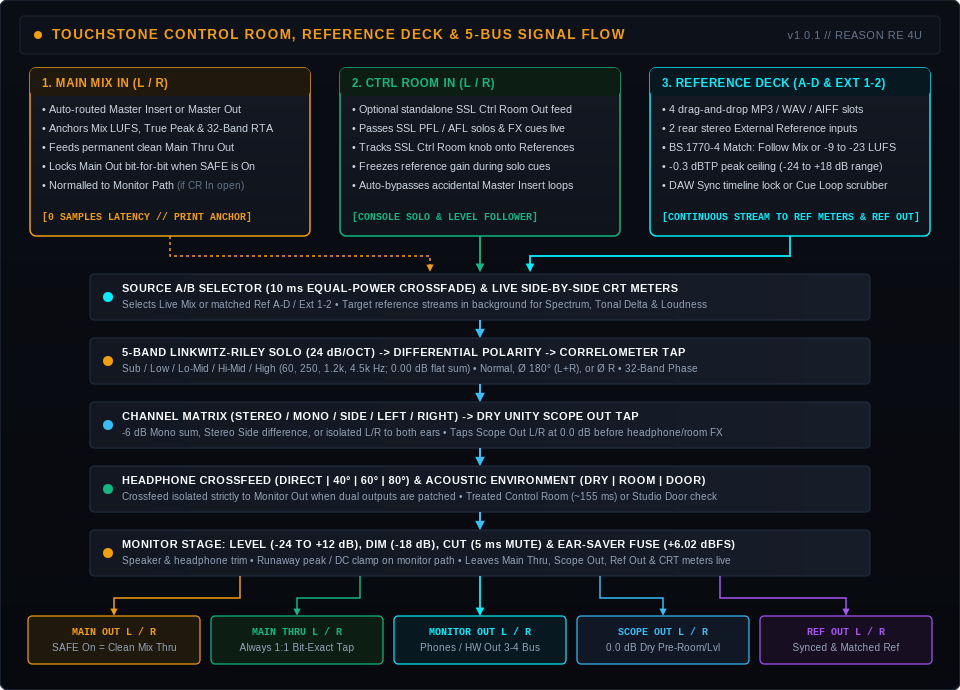
1.2 Output Bus & Meter Immunity Summary
| Tap / Bus | Source A/B + Match | 5-Band Solo | Polarity (Ø 180 / Ø R) | Channel (Mono/Side/L/R) | Crossfeed (40° to 80°) | Acoustic (Room/Door) | Dim / Cut / Level / Fuse |
|---|---|---|---|---|---|---|---|
Main Out (SAFE On) | No (Bit-Exact Thru) | No | No | No | No | No | No |
Main Out (SAFE Off, Single Out) | Yes | Yes | Yes | Yes | Yes | Yes | Yes |
Main Out (SAFE Off, Dual Out) | Yes | Yes | Yes | Yes | No (Phones only) | Yes | Yes |
Main Thru Out | No (Always Bit-Exact) | No | No | No | No | No | No |
Monitor Out | Yes | Yes | Yes | Yes | Yes | Yes | Yes |
Scope Out | Yes | Yes | Yes | Yes | No | No | No (0.0 dB unity) |
Ref Out | Latched Ref + Match | No | No | No | No | No | No |
| Mix & Ref Meters / RTA / Delta | Mix = raw, Ref = matched | Visual shade | No | No | No | No | No |
| 32-Band Correlometer | Yes | Yes | Yes | No (pre-Mono/Side) | Yes (when single out) | No | No |
2. Front-Panel Guided Tour (4U Console & 1U Folded Strip)
Touchstone’s 4U console is organized into three horizontal tiers: Tier 1 (Upper Tactile Console), Tier 2 (4-Slot Reference Deck), and Tier 3 (Full-Width Mastering CRT). Every radio button group uses click-to-toggle-off behavior: click an unlit button to engage it, and click the active button again to return straight to its flat default state.
2.1 Bay 1: Identity, Patch Browser & Power
- Patch Display & Browser: Loads and saves
.repatchpresets across all 8 factory control room setups. OFF | ON | BYPPower Switch:OFF(red): Mutes all outputs cleanly and shows a redPower Offbanner on the CRT.ON(green): Normal active control room operation.BYP(amber): PassesMain Mix Instraight throughMain Out,Main Thru, andScope Outand showsBypassedon the CRT.
Solo / RefWarning Lamp: Lights amber whenever non-flat monitoring (Reference playback, Band Solo, Mono/Side/L/R, Polarity, Crossfeed, Room/Door, Dim, Cut, non-unity Level, orCtrl Room In) is audible onMain OutwithSAFEturned off. Turns off automatically wheneverSAFEprotectsMain Out.
2.2 Bay 2: Source Deck (REF A through REF D, EXT 1 & EXT 2, MATCH, SYNC)
REF AthroughREF D(cyan): Auditions any loaded reference track with a click-free 10 ms equal-power crossfade. Click the lit button again to return toLive Mix.EXT 1&EXT 2(amber): Switches to the rear stereo External Reference inputs (Ext Ref 1 L/R,Ext Ref 2 L/R), metered live for loudness matching.MATCH(cyan): Enables ITU-R BS.1770-4 loudness matching acrossRef AthroughRef DandExt 1/Ext 2. Target selection lives in the CRT Row AMatchpill:[Mix](Follow Live Mix, default): Scales references (-24.0 to +18.0 dB) to match your live mix’s loudness, guarded by a -0.3 dBTP peak ceiling so quiet acoustic mixes never clip loud masters.- Fixed & K-System Targets (
[-9],[-12],[-14],[-16],[-20],[-23]): Locks references right away to -9 LUFS (Loud/Club), -12 LUFS (K-12), -14 LUFS (K-14 / Streaming), -16 LUFS (Apple / AES), -20 LUFS (K-20), or -23 LUFS (EBU R128) even when your mix is stopped, while keepingLive Mixuntouched at 0.0 dB unity. Clicking any target chip whileMATCHis off enablesMATCHin one click; clicking an active fixed chip returns toMix.
SYNC(green): Switches betweenDAW Sync(lit) andCue Loop(unlit):DAW Sync: Locks reference playback to Reason’s song timeline. Jumping to Bar 49 in the sequencer jumps to the matching timestamp in your reference track, shifted by yourCue Positionwaveform offset so intros and drops line up.Cue Loop: Transport-independent continuous looping that honors Reason Sample Editor Play Range and Loop Range markers so you can loop and scrub choruses while Reason’s transport is stopped.
2.3 Bay 3: Band & Solo Matrix
- 5-Band Solo (
SUB | LOW | LO-MID | HI-MID | HIGH): Phase-aligned 24 dB/oct Linkwitz-Riley splits at 60 Hz, 250 Hz, 1.2 kHz, and 4.5 kHz (Subbelow 60 Hz,Low60 to 250 Hz,Lo-Mid250 Hz to 1.2 kHz,Hi-Mid1.2 to 4.5 kHz,Highabove 4.5 kHz) summing to 0.00 dB flat across any single band or multi-band combination:- Click one band to solo it; click the active band again to return to Full Range.
Shift + Clickadds or removes individual bands (combining all five returns to Full Range).- Click and drag horizontally across buttons to sweep any contiguous band span.
- Channel Solo (
MONO | SIDE | LEFT | RIGHT): -6 dB constant-voltageMONOsum, stereoSIDEdifference, or isolatedLEFT/RIGHTrouted to both ears. - Differential Polarity (
Ø 180 | Ø R): Applied right before the Channel Matrix and Correlometer.Ø 180inverts both Left and Right;Ø Rinverts only the Right channel to diagnose out-of-phase stereo stems that cancel in mono.
2.4 Bay 4: Monitor Stage
SAFE(Armored Amber): LocksMain Out L/Rto bit-for-bitMain Mix Inpassthrough (0.00 dB, 0 samples latency).DIM -18(cyan) &CUT(red): -18.0 dB monitor pad and click-free 5 ms monitor mute (Main Thru,Scope Out,Ref Out,SAFE-lockedMain Out, and all CRT meters keep running uninterrupted).- Headphone Crossfeed (
DIRECT || 40° | 60° | 80°): Models speaker-triangle interaural timing and head-shadow roll-off across 40° (Nearfield), 60° (Equilateral), and 80° (Wide Mains) while keeping mono sub-bass calibrated to 0.0 dB. When bothMain OutandMonitor Outare patched, Crossfeed isolates automatically toMonitor Out(Phonesfooter tag). - Acoustic Environment (
ROOM | DOOR):ROOM(green): Adds treated studio control-room early reflections and a tight ~155 ms decay voiced for closed-back headphones, staying loudness-neutral (within ±0.20 LU) and leaving sub-60 Hz bass clean.DOOR(amber): Simulates listening through a closed solid-core studio door from the hallway outside so you can judge vocal-to-bass balance in seconds.- Both modes apply only to
Monitor Outand un-safeMain Out(leavingSAFEMain Out,Main Thru,Scope Out,Ref Out, and all meters completely dry) and drop to 0% CPU whenDry.
Level(-24.0 to +12.0 dB, default 0.0 dB): Smooth rotary monitor trim (Cmd/Ctrl + Clickresets to 0.0 dB).- Ear-Saver Fuse: Protects your ears and monitors on the monitor path by clamping runaway spikes above +6.02 dBFS or heavy DC offsets and latching
FUSE! Reseton the CRT until clicked. Normal audio below +6.02 dBFS passes untouched.
2.5 Tier 2: Reference Cartridges & Sample Management
- 4 Reference Cartridges (
AthroughD): Each card shows its slot tab (bright cyan = active source, dark cyan = loaded, amber outline = Sample Browser target, dark slate = empty), filename,Active/Pickerbadge, and unmatched Integrated LUFS and dBTP true peak. - Song-Length Playback & Sample Editor Trim: Drop full-length MP3, WAV, or AIFF tracks onto any card across any project sample rate (22.05 to 192 kHz). Click Edit Sample in the right-hand Sample Browser to set Play Range or Loop Range markers for chorus-to-chorus
Cue Loopchecks. - Keeping Self-Contained
.reasonSong Files Small: When Reason saves a self-contained song, loaded reference samples are bundled inside the.reasonfile (a 4-minute 24-bit/48 kHz WAV adds ~65 MB). Select unused slots (Picker) and click Delete Sample in the Sample Browser before archiving or sharing.reasonprojects.
2.6 Compact 1U Folded Strip
Fold Touchstone in the rack to save vertical space while keeping everyday control room switches right on the 1U faceplate: OFF / ON / BYP, Patch Browser, A through D and E1 / E2 source chiclets, SUB / LOW / LM / HM / HI band solo buttons, XFEED toggle, armored SAFE, mini Level trim, and a 385 × 65 px scribble tape.

3. Mastering CRT Views & Wide Plot Metering
Tier 3 houses a full-width vector CRT organized into four rows:
- Row A (Status Header):
Sourcepill (click to cycle),Match [Mix] [-9] [-12] [-14] [-16] [-20] [-23]target and gain pill, andSAFE • Main = Thru/LIVE • Monitor on Mainstatus pill. - Row B (Mode & Action Bar): Mode tabs (
Spectrum,Tonal Delta,Correlometer,Loudness & Dynamics), center active status badge (CUT,Control Room,Studio Door, orSolo: ...; click any badge to clear),Wide Plottoggle, andReset Meters(FUSE! Resetin red when tripped). - Row C (Main Canvas & Meter Bridge): Shared 25 Hz to 18 kHz logarithmic frequency grid with 60 Hz, 250 Hz, 1.2 kHz, and 4.5 kHz band split lines. When
Wide Plotis off on the first three views, the right Meter Bridge showsMIXandREFpeak/RMS bars, largeINT LUFSanddBTPcards (click to reset), active monitor state, and a broadbandCorrphase bar. - Row D (Waveform Scrubber): Clickable
Sync/Cuepill beside a 116-bar reference waveform showing Sample Editor loop markers, live Target Reference playhead (active even while listening toLive Mix), and draggableCue Positionmarker (Shift + Dragfor fine scrubbing).
3.1 Spectrum (32-Band Dual RTA)
Overlays your Live Mix (amber) and Target Reference (cyan) across 32 1/3-octave filter bands (25 Hz to 18 kHz, 0 to -60 dB scale) with shaded solo highlights whenever Band & Solo is active.
3.2 Tonal Delta (Mix Minus Ref Curve)
Plots the spectral difference Mix - Ref across ±12 dB:
- Amber fill above 0 dB: Your mix has more energy than the reference in that band.
- Cyan fill below 0 dB: Your mix is quieter than the reference in that band.
- ±3 dB Sweet-Spot Corridor: Shaded target band around 0 dB so you can spot tonal tilt imbalances without clicking away from
Live Mix.
3.3 Correlometer (32-Band Spectral Phase)
Measures per-band Left/Right phase correlation across all 32 bands, tapped after Polarity (Ø 180 / Ø R) and before Channel Matrix (Mono / Side) so you can inspect underlying stereo phase even while monitoring in Mono. Green bars toward +1 show mono-compatible energy; red bars toward -1 warn of phase cancellation.

3.4 Loudness & Dynamics (Split Matrix & Wide Plot 7-Card Mode)
- Compact Split Layout (
Wide PlotOff): Twin horizontal -60 to +3 dB Mix and Reference lanes on the left, paired on the right with a 5×2MIXvs.REFtable comparingINT(Integrated LUFS),SHORT(3 s Short-Term LUFS),LRA(Loudness Range in LU),TP(4x True Peak in dBTP), andPSR(Peak-to-Short-Term Ratio: green ≥ 8.0 LUDynamic, amber 5.5 to 8.0 LUTight, red < 5.5 LUSquashed). - Full-Width LPM Layout (
Wide PlotOn): Stretches twin broadcast meter lanes (-54 to +3 dB) across the full screen above 7 equal-width readout cards:MOMENTARY,SHORT TERM,INTEGRATED,LOUD RANGE,MATCH GAIN,TRUE PEAK, andPSR DYNAMICS. Click any card or matrix cell to reset all meters.

4. Rear Audio Bus Matrix & Control Room CV (21 Jacks)
Flip the rack (Tab) for 18 audio jacks (4 stereo inputs over 5 independent stereo outputs) plus 3 Control Room CV jacks and an on-panel wiring guide.

4.1 Stereo Audio Inputs (Top Row, 8 Jacks)
MAIN MIX IN (L/R)(Auto-Routed): Primary mix input feedingSAFEpassthrough,Main Thru, Mix metering, and (wheneverCtrl Room Inis unpatched) theLive Mixmonitor path.CTRL ROOM IN (L/R)(Console CR): Optional input from Reason Master SectionCtrl Room Outfor standalone post-master setups, complete with a top-right red loop-fault LED.EXT REF 1 (L/R)&EXT REF 2 (L/R)(Stereo In): Live stereo reference inputs for stems, rough mixes, or alternate mastering chains, metered continuously for BS.1770-4 loudness matching.
4.2 Independent Stereo Audio Outputs (Bottom Row, 10 Jacks)
MAIN OUT (L/R)(Safe On = Thru): Auto-routed primary output; locks to a bit-for-bit copy ofMain Mix InwheneverSAFEis on.MAIN THRU (L/R)(Always Clean): Permanent 1:1 clean copy ofMain Mix In, unaffected by every monitor control.MONITOR OUT (L/R)(Phones / Xfeed): Dedicated un-bounced headphone or studio monitor output for Hardware Audio Out 3/4. Carries your full control room chain whileSAFEprotectsMain Out, and receives isolated Crossfeed when both outputs are patched.SCOPE OUT (L/R)(Pre-Level • Dry): Unity 0.0 dB tap taken after Source, Band Solo, Polarity, and Channel Matrix (strictly before Crossfeed, Room/Door, Dim, Cut, Level, and Fuse) for feeding external spectrum and phase meters.REF OUT (L/R)(Sync • Matched): Continuous DAW-synced, loudness-matched stream of your active target reference (Ref AthroughRef DorExt 1/2), sleeping at 0% CPU when unpatched onLive Mix.
4.3 Standalone Dual-Bus SSL Ctrl Room In Behavior
When wired standalone between Reason’s Master Section (Master Out to Main Mix In, Ctrl Room Out to Ctrl Room In) and Hardware Interface:
- Locked Mix Anchor:
Main Mix InkeepsSAFEpassthrough,Main Thru, Mix LUFS/True Peak, and the Mix RTA anchored to your true print bus. - Automatic SSL
Ctrl RoomVolume Tracking: Turn Reason’s SSLCtrl Roomknob down and Touchstone scalesRef AthroughRef DandExt 1/2by the exact same gain so switching to a reference never jumps in volume (holding that level across transport stops). - Solo & Cue Gain Freeze (
Source: CR Cue / Solo): Press Solo (PFL/AFL) on any mixer channel or audition an FX return and the CRT header switches to greenSource: CR Cue / Solo, freezing the tracked reference gain so soloing a quiet stem never pulls your reference level down. - Accidental Loop Protection: If
Ctrl Room Inis accidentally patched into a dead feedback loop inside a Master Insert, Touchstone ignores the silent loop so your audio stays live, and lights the red fault LED inside the rearCTRL ROOM INjack box.
4.4 Control Room CV Matrix (3 Jacks)
SOURCE(0 to 1V SelectCV In): Stepped unipolar CV selectingLive Mix(0) throughExt 2(6) for hardware controller buttons or blind A/B testing.BINAURAL(Gate InCV In): Gate ≥ 0.5 engages Headphone Crossfeed momentarily without changing your saved patch state.REF ACT(Gate OutCV Out): Outputs 1.0 whenever monitoringRef AthroughExt 2, and 0.0 onLive Mix.
5. Studio Routing & Rack Integration Recipes
Recipe 1: Live EQ Matching with Solstice (Ref Out -> Solstice Ref In)
Pair Touchstone with Solstice right inside your Master Section to match EQ curves against any loaded reference track without extra splitters:
- Place Solstice in the insert slot directly above Touchstone, and load your commercial reference into Touchstone Cartridge
AwithMATCHon. - Flip the rack (
Tab) and patch TouchstoneREF OUT L/Rinto SolsticeREF IN L/R. - Keep Touchstone on
Live Mixso you hear your own mix changes live. Open[EQ Match]in Solstice and selectRef In: Touchstone continuously feeds your DAW-synced, loudness-matched reference track straight into Solstice’s profiler.
Recipe 2: Feeding External Analyzers Dry While Mixing on Headphones (Scope Out)
If you run external meters (such as Spyglass) downstream of Touchstone while mixing on headphones with 60° Crossfeed, ROOM, and DIM -18 active, don’t feed them from Monitor Out (which would skew phase and level meters with headphone crossfeed and dim attenuation). Patch SCOPE OUT L/R to your external analyzers instead: they’ll follow your A/B source switches, 5-band solos, and mono/polarity checks at a clean, dry 0.0 dB unity level.
Recipe 3: Blind Reference Shootouts via Combinator 2 (Source CV)
To test whether your mix holds up without visual bias from knowing which track is playing:
- Wrap Touchstone and a Pulsar LFO (or Thor step sequencer) inside a Combinator 2, or map a hardware controller pad to
SOURCECV. - Patch a stepped random Sample & Hold CV (scaled between 0.0V and 0.35V to step between
Live MixandRef A/Ref B) into Touchstone’s rearSOURCECV input, fold Touchstone to 1U (or scroll away), and adjust your mix bus EQ purely by ear.
6. Factory Preset Reference (8 .repatch Patches)
| # | Preset File (Resources/Public/) | Key Configuration | Recommended Use |
|---|---|---|---|
| 1 | Default.repatch | Live Mix, Match On (Follow Mix), DAW Sync, Full Range, Stereo, DIRECT, Dry, SAFE Off, Level 0.0 dB | Clean Master Section insert starting point |
| 2 | Export Safe Control Room (Phones Out 3-4).repatch | SAFE On, 60° Crossfeed On, Match On | Permanent 4-output rig (Main Out to 1/2, Monitor Out to 3/4) |
| 3 | 60 deg Equilateral Headphone Studio.repatch | 60° Crossfeed On, Match On, SAFE Off | Everyday studio headphone mixing on a 2-output rig |
| 4 | 40 deg Nearfield Desk Check.repatch | 40° Crossfeed On, Match On, SAFE Off | Tight desktop nearfield phantom-center check |
| 5 | 80 deg Wide Mains Check.repatch | 80° Crossfeed On, Match On, SAFE Off | Wide mains stereo spread and reverb tail check |
| 6 | Sub and Low-End Translation (Sub 60 Hz).repatch | Band Solo = SUB (below 60 Hz), Match On | Comparing kick and 808 sub weight against a reference |
| 7 | Midrange Vocal and Snare Focus (250 Hz - 4 kHz).repatch | Band Solo = LO-MID + HI-MID (250 Hz to 4.5 kHz), Match On | Checking vocal presence, snare body, and midrange balance |
| 8 | Mono Compatibility and Phase Check.repatch | Channel Mode = MONO, Match On | Fast mono-collapse check for bass, leads, and stereo FX |
7. MIDI CC, Reason Remote & Combinator 2 Reference
7.1 MIDI Implementation Chart
| MIDI CC | Control | Range / Behavior |
|---|---|---|
| CC 7 | Monitor Level | -24.0 to +12.0 dB (0.0 dB at ~67%) |
| CC 12 | Monitor Source | 7 steps: Live Mix, Ref A through Ref D, Ext 1, Ext 2 |
| CC 13 | LUFS Loudness Match | Off / On |
| CC 14 | Frequency Band Solo | 32 steps (0 to 31 additive 5-band combinations) |
| CC 15 | Channel Solo Mode | 5 steps: Stereo, Mono, Sides, Left, Right |
| CC 16 | Headphone Crossfeed | Off / On |
| CC 17 | Crossfeed Speaker Angle | 3 steps: 40°, 60°, 80° |
| CC 18 | Monitor Dim (-18 dB) | Off / On |
| CC 19 | Export Safe | Off / On |
| CC 20 | Reference Cue Position | 0.0% to 100.0% waveform offset |
7.2 Reason Remote & Combinator 2 Mapping Table
| Remote Internal Name | Short / Tiny | Type & Range |
|---|---|---|
Monitor Source | Source / Src | 7 steps (Live Mix, Ref A through Ref D, Ext 1, Ext 2) |
LUFS Match | Match / Mtch | Off / On |
LUFS Match Target | Target / Tgt | 7 steps (Follow Mix, -9, -12, -14, -16, -20, -23) |
Sync Mode | Sync / Sync | 2 steps (DAW Sync / Cue Loop) |
Band Solo | BandSolo / Band | 32 steps (0 to 31 additive 5-band combinations) |
Channel Mode | Channel / Chan | 5 steps (Stereo, Mono, Sides, Left, Right) |
Polarity Invert | PolInv / Pol | Off / On (Ø 180° L+R invert) |
Polarity Right | PolRight / PolR | Off / On (Ø R Right-only invert) |
Binaural Room | Xfeed / Xfd | Off / On (Headphone Crossfeed) |
Speaker Angle | Angle / Angl | 3 steps (40°, 60°, 80°) |
Acoustic Environment | Acoust / Env | 3 steps (Dry, Control Room, Studio Door) |
Monitor Trim | Level / Lvl | Continuous -24.0 to +12.0 dB (0.0 dB default) |
Monitor Dim | Dim / Dim | Off / On (-18.0 dB pad) |
Monitor Cut | Cut / Cut | Off / On (5 ms monitor mute) |
Export Safe | Safe / Safe | Off / On (Main Out bit-for-bit Thru) |
Cue Position | CuePos / Cue | Continuous 0.0% to 100.0% |
CRT View | CRTView / View | 4 steps (Spectrum, Tonal Delta, Correlometer, Loudness & Dynamics) |
CRT Wide | WideCRT / Wide | Off / On (Wide Plot 7-Card Mode) |
8. Under the Hood & Technical Specifications
8.1 DSP Architecture & Calibration Notes
- Two-Pass ITU-R BS.1770-4 & EBU Tech 3342 Engine: Loaded reference files undergo a background two-pass K-weighted scan (-70 LUFS absolute gate, -10 LU relative gate, 0.05 LU histogram bins) alongside 4x Catmull-Rom inter-sample True Peak analysis and 256-bin waveform extraction. Real-time streams (
Main Mix InandExt Ref 1/2) run 64-bit K-weighted accumulators at a 10 Hz (100 ms) EBU R128 hop rate for Momentary (400 ms), Short-Term (3 s), Integrated LUFS, Loudness Range (LRA, 0.10 LU histogram), andPSR(TP - Short). - Resampling, Timeline Lock & Declicking: Loaded samples stream across 22.05 to 192 kHz via 4-point Catmull-Rom cubic interpolation, locking to Reason’s timeline at 15,360 PPQ in
DAW Syncmode. Mix/Reference source switches use 10 ms equal-power crossfades, while band, channel, and polarity switches bridge steps with an 8 ms raised-cosine declicker. - Phase-Aligned 5-Band Linkwitz-Riley Crossover: Four 4th-order (24 dB/oct) Linkwitz-Riley splits at 60 Hz, 250 Hz, 1.2 kHz, and 4.5 kHz with matched 2nd-order Butterworth all-pass phase compensation reconstruct to 0.00 dB flat magnitude across all 32 band combinations.
- Headphone Crossfeed & Closed-Back Acoustic Models: Crossfeed pairs Woodworth spherical-head fractional interaural time delays (0.176 ms at 40°, 0.261 ms at 60°, and 0.342 ms at 80°) with a 700 Hz contralateral head-shadow low-pass and unity direct-path normalization so mono sub-bass remains calibrated to 0.0 dB.
ROOMmodels an ITU-R BS.1116 treated control room (+8.2 dB direct-to-reverberant ratio, 150 Hz 12 dB/oct bass-trap high-pass keeping sub-60 Hz shifts under 0.12 dB, 4 cross-ear lateral reflection pairs from 5.9 to 25.1 ms, 2-stage Schroeder rear diffuser, and a ~155 ms 2×2 Householder FDN tail within ±0.20 LU).DOORapplies 85% Mid / 15% Side pre-summing, 48 Hz to 340 Hz solid-core door mass-law filtering, a 1.1 kHz perimeter seal roll-off, and a 3-tap asymmetric corridor slap. - SSL
Ctrl RoomGain Estimator & Ear-Saver Fuse: Dual-busCtrl Room Intracking runs a closed-form least-squares gain estimator gated on stereo cross-correlation (r ≥ 0.99), freezing gain whenever solo/cue divergence drops correlation below 0.98. The Ear-Saver Fuse clamps non-finite samples, DC offsets (≥ 0.35), and peaks above +6.02 dBFS while keeping signals below threshold bit-exact.
8.2 Technical Specifications Summary
| Specification | Details |
|---|---|
| Product Identifier | ca.boraas.Touchstone (Version 1.0.1) |
| Format | 4U Full-Width Studio Effect + Active 1U Folded Rack Strip |
| Internal Precision & Sample Rates | 64-bit internal filter and loudness accumulators, 32-bit float I/O, 22.05 to 192 kHz |
| Audio Latency | 0 samples on Main Out (SAFE On / flat Mix) and Main Thru (zero host PDC) |
| Reference Deck | 4 drag-and-drop MP3, WAV, or AIFF slots + 2 rear stereo External Reference inputs |
| Loudness Matching | Follow Mix or 6 fixed targets (-9, -12, -14, -16, -20, -23 LUFS), -24.0 to +18.0 dB range, -0.3 dBTP peak guard |
| Band & Channel Matrix | 5-band 24 dB/oct LR4 solo (60 Hz, 250 Hz, 1.2 kHz, 4.5 kHz; 0.00 dB sum) + Stereo, Mono (-6 dB), Side, L, R + Ø 180° / Ø R |
| Headphone & Room Sim | 40° / 60° / 80° Woodworth ITD Crossfeed (Phones-isolated on dual outputs) + Control Room & Studio Door |
| Rear Connectivity (21 Jacks) | 8 Audio Inputs (Main Mix In, Ctrl Room In, Ext Ref 1/2), 10 Audio Outputs (Main Out, Main Thru, Monitor Out, Scope Out, Ref Out), 3 CV Jacks (Source In, Binaural Gate In, Ref Act Gate Out) |
| System Requirements | Reason 10.1 or later (macOS Universal Apple Silicon/Intel & Windows 64-bit, Standalone & Reason Rack Plugin) |