
Hyperbar 3-Band Upward/Downward Dynamics: Operation Manual & Studio Reference Guide
Product Identifier: ca.boraas.Hyperbar
Build Version: 1.0.0f142
Device Classification: Creative Effects / Dynamics (Dynamics, Filter, EQ, Multiband, Mastering)
Rack Format: 4U Full-Width (collapsible to active 1U folded strip)
Supported Platforms: Reason 10.1+ (macOS Intel & Apple Silicon Universal, Windows 64-bit)
Author: Edward Boraas
1. Overview & Signal Flow
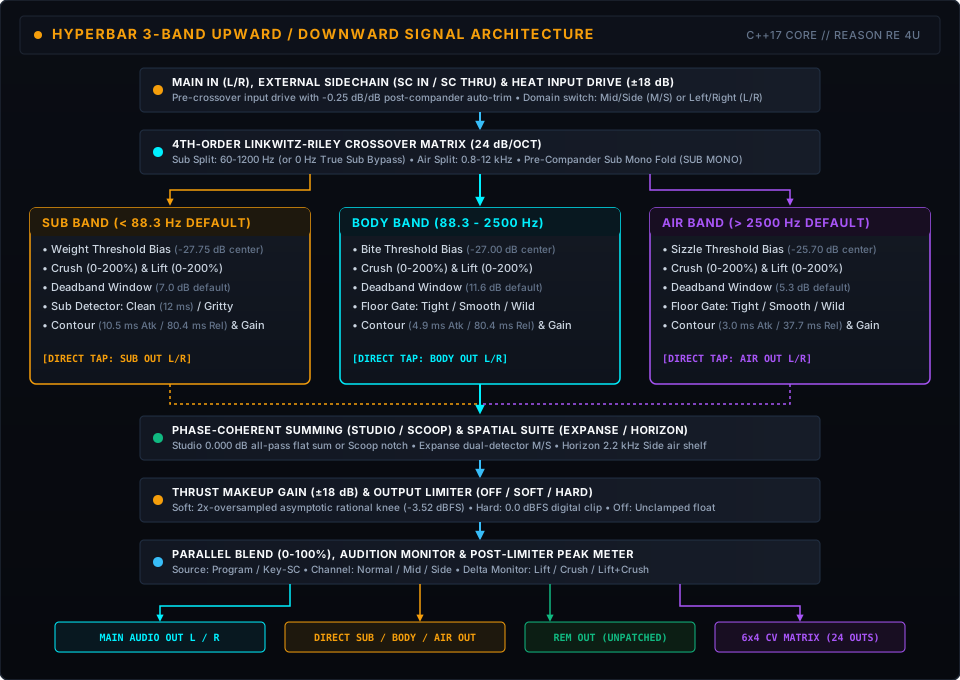
Hyperbar is a 3-band upward and downward dynamics processor (OTT-style multiband compander) built natively for the Reason Rack.
While a standard compressor only turns loud peaks down once they cross a threshold, Hyperbar works in both directions at once across three frequency bands (SUB, BODY, and AIR). It pulls quiet room decay, reverb tails, and low-level harmonic detail upward by up to +36 dB while clamping loud peaks downward by up to -24 dB (-48 dB at 200% overpressure). Between those two thresholds sits a configurable linear Deadband (0-48 dB) where mid-level dynamics pass at unity (1:1) without constant gain riding.
The Character Switches (Clean Mastering or Classic OTT Grit)
Classic digital OTT processors from the 2000s owe part of their signature sound to early DSP quirks: phase-cancellation notches at the crossover points, sub-bass waveform tracking distortion, and noise-floor hiss surging upward during pauses. Instead of locking you into either a clinical cleanup or permanent artifacts, Hyperbar puts three switches in the Engine & Spatial drawer so you can choose per patch:
X-OVER(SCOOP | STUDIO):Studiomode adds a 2nd-order all-pass phase-compensation network so the three bands sum completely flat (±0.000 dB).Scoopmode omits the all-pass stage, bringing back the classic crossover phase notch for a hollow, mid-scooped bite.SUB DET(GRITTY | CLEAN):Cleanmode uses a 12 ms anti-ripple peak-hold detector so deep 808s and sine subs stay smooth.Grittymode tracks sub waveforms instantaneously, adding fast envelope-ripple harmonic saturation.FLOOR(WILD | SMOOTH | TIGHT): A 3-way switch setting the upward expansion noise-floor gate:Tight(-55 to -67 dBFS, 12 dB soft knee): Clamps tightly for speech, vocals, and noisy stems.Smooth(default, -62 to -80 dBFS, 18 dB progressive knee): Clean mix and master bus leveling without audible noise pumping.Wild(-75 to -95 dBFS, 20 dB wide knee): Pulls quiet signals all the way down to -75 dBFS upward so long reverb tails and room tone bloom between notes.
2. Front-Panel Guided Tour (4U Upper Deck)
Hyperbar’s 4U front panel divides controls into two layers: the upper deck holds the macro controls and 3-band sight-glass meters for everyday mixing, while the lower Calibration Drawer tucks per-band depths, crossovers, and stereo imaging behind two expandable tabs (BAND DYNAMICS and ENGINE & SPATIAL, saved with your Reason song across patch changes). All primary gain (Heat, Thrust, per-band Gain, and band threshold faders), depth (Squeeze, per-band Crush and Lift), and Speed controls use non-linear S-curves that give you roughly 1.5x-2.2x finer resolution in the 10-to-2 o’clock sweet spot while still reaching full range at the extremes.

2.1 Header Bar
BYP / ON / OFFSwitch: 3-state power and bypass switch (clicking anywhere on the switchplate or labels toggles state).- Patch Browser: Recessed LCD readout with previous/next (
▲/▼), folder browser, and save buttons for navigating all 39 factory patches.
2.2 Bay 1: Pre / Tone Shaping & Timing (SPEED & HEAT)
SPEED(0.73-18.4, default3.67:SLOW • OTT • FAST): Scales attack and release speed across all three bands together from 0.20x to 5.0x (a 25:1 range). At3.67(12 o’clock), envelope time constants sit at calibrated OTT baseline timing (Sub: 10.47 ms Atk / 80.44 ms Rel; Body: 4.91 ms Atk / 80.44 ms Rel; Air: 2.96 ms Atk / 37.65 ms Rel). Turn counter-clockwise toward0.73(SLOW) to slow envelopes up to 5x for smooth bus leveling or sustained reverb tails; turn clockwise toward18.4(FAST) to speed up attack and release up to 5x for fast rhythmic pumping.HEAT(-18.0 to +18.0 dB, default0.0 dB:-18 • +18 dB): Pre-crossover input drive into the 3-band compander. PushingHeatup drives all three bands harder into downwardCrushwhile pulling quiet details out of upwardLift. To prevent runaway volume jumps while you dial in drive, positiveHeatautomatically applies a -0.25 dB/dB post-compander trim (up to -4.5 dB at +18 dB).
2.3 Bay 2: 3-Band Sight-Glass Dynamics Core (SUB, BODY, AIR)
Each of the three bands pairs a three-track Sight-Glass Meter (+6 dB down to -60 dB) with a vertical threshold bias fader:
- Sight-Glass Meter Tracks (
IN,DYN,OUT):IN(Left): Pre-dynamics band input level (L/RorM/S).DYN(Center): Bidirectional dynamics activity from the center zero line. Amber/orange bars descend from the top to show downward gain reduction (Crush), while cyan bars rise from the bottom to show upward expansion (Lift).OUT(Right): Post-dynamics, post-gain band output level.
- Vertical Threshold Bias Faders (
WEIGHT,BITE,SIZZLE,-18.0 to +18.0 dB, default0.0 dB):- Shifts both the upward and downward thresholds for that band together around pink-noise-calibrated baseline centers (-27.75 dB Sub, -27.00 dB Body, -25.70 dB Air).
- Raising
WEIGHT(Sub),BITE(Body), orSIZZLE(Air) raises the band’s target window, pulling more low-level energy upward; lowering the fader pushes the band deeper into downwardCrush.
2.4 Bay 3: Master Stage (2x2 Output Grid & Post-Limiter Metering)
Organized into a 2x2 rotary grid alongside stereo output peak meters:
SQUEEZE(0-200%, default100%:0% • 100% • 200%): Global compander depth macro scaling both upwardLiftand downwardCrushdepths across all three bands simultaneously. From 0-100% (cyan halo), ratios scale up to classic OTT levels; pushing from 100-200% (amber-orange halo) enters overpressure mode, driving downward compression past ∞:1 into negative ratios (at 114.3%, around 2 o’clock) and doubling upward lift range.CONTOUR(SMOOTH • OTT • PEAKY,-100% to +100%, default0%, MIDI CC 72): Master ballistics contour dial positioned directly beneathSQUEEZE. Offsets the attack-to-release ratios across all three bands simultaneously without opening the drawer. Center (0%, 12 o’clock) preserves individual band contours; turning counter-clockwise towardSMOOTH(-100%) speeds up attack and extends release for dense, pinned sustain; turning clockwise towardPEAKY(+100%) slows attack and speeds up recovery for punchy transient crack.BLEND(0-100%, default100%:DRY • WET): Parallel dry/wet mix before the final output peak meters.THRUST(-18.0 to +18.0 dB, default0.0 dB:-18 • +18 dB): Master post-compander makeup gain feeding the output limiter stage.- Stereo
OUTPUT PEAK dBFSMeters (L/R,+6 to -48 dBFS): True post-limiter stereo peak bar meters:0.0 dBFSCalibration:0.0 dBFSlights up to the top amber LED (segment 18, right under the golden0 dBline), while levels strictly above0.0 dBFS(+0.1 to +6.0 dBFS) light the 4 red Overpressure LEDs at the top of the ladder.- Quick Clipper Check (MClass Maximizer Workflow): Because
SoftandHardlimiter modes clamp output peaks at or below0.0 dBFS, the meter snaps cleanly to the0 dBline when limiting is active. FlipLimitertoOffin the drawer to watch how many red LEDs light up above0 dBand judge how hard you’re driving the clipper.
2.5 Compact 1U Folded Strip
When folded in the Reason rack, Hyperbar keeps its header controls (BYP/ON/OFF and Patch Browser) at identical coordinates and exposes a 1U control strip mirroring the 4U left/center/right layout:

- Left:
SPEEDandHEATinput drive dials. - Center: Vertical
SUB,BODY, andAIRbidirectional dynamics activity meters. - Right:
SQUEEZE,BLEND,CONTOUR,THRUST, and stereoOUTpeak meters.
3. The Calibration Drawer (Band Dynamics & Engine & Spatial)
Clicking the tabs along the bottom rail of the upper deck switches the lower bay between two open views (BAND DYNAMICS and ENGINE & SPATIAL). Clicking whichever tab is currently open (or clicking DRAWER CLOSED) closes the drawer. Because the drawer state is saved with your Reason song rather than per preset, switching or browsing patches never resets your open view.
3.1 Tab 1: BAND DYNAMICS (Per-Band Voicing)

Exposes three side-by-side band bays (LOW DYNAMICS for Sub, MID DYNAMICS for Body, HIGH DYNAMICS for Air), each equipped with SOLO and MUTE buttons and five rotary trims:
SOLO&MUTEButtons: Audition any band (or combination of bands) in isolation, or mute specific frequency ranges.CRUSH(DOWNWARD,0-200%, default100%): Scales downward compression depth for the band (multiplied by the masterSqueezemacro).DEADBAND(WINDOW,0.0-48.0 dB, defaults:7.0 dBSub,11.6 dBBody,5.3 dBAir): Sets the width of the neutral 1:1 linear zone between the downwardCrushthreshold and upwardLiftthreshold, defaulting to classic OTTAbove - Belowthreshold gaps (7.0 / 11.6 / 5.3 dB). TighteningDeadbandtoward 0 dB clamps the signal into a tight window; widening it opens a natural pocket where mid-level transients breathe untouched.LIFT(UPWARD,0-200%, default100%): Scales upward compression depth for the band (up to +36.0 dB maximum boost).CONTOUR(SMOOTH/PEAKY,BALLISTICS, default0.50): Skews the band’s attack-to-release ratio across a 9x span (0.33x-3.0x):- Smooth (
0.0, 0.33x): Faster attack and longer release for thick, pinned weight. - OTT Center (
0.50, 1.0x): Calibrated OTT baseline ratios (Sub: 10.47 ms Atk / 80.44 ms Rel [1:7.7]; Body: 4.91 ms Atk / 80.44 ms Rel [1:16.4]; Air: 2.96 ms Atk / 37.65 ms Rel [1:12.7]). - Peaky (
1.0, 3.0x): Slower attack and faster release so initial drum and pluck transients punch through before compression clamps down.
- Smooth (
GAIN(OUTPUT,-18.0 to +18.0 dB, default0.0 dB): Post-compander makeup gain for balancing the three bands before summing.
3.2 Tab 2: ENGINE & SPATIAL (Crossovers, Character, Stereo & Audition)

Divided into four functional sub-bays across the lower drawer:
Bay 1: Crossover & Sub Anchor
SUB SPLIT(Off0 Hz Sub Bypass /60-1200 Hz, default88.3 Hz): Sets the 4th-order Linkwitz-Riley crossover frequency betweenSubandBody. TurningSub Splitall the way counter-clockwise below 61 Hz (Off) engages a true 0 Hz Sub Bypass soBodyandAiroperate as a phase-coherent 2-band split down to DC.AIR SPLIT(800-12000 Hz, default2.50 kHz): Sets the 4th-order Linkwitz-Riley crossover frequency betweenBodyandAir. IfSub Splitis pushed aboveAir Split, Hyperbar automatically clamps the upper split at least 200 Hz aboveSub Splitso theBodybandpass never inverts.SUB STEREO/SUB MONOToggle Button: Folds theSubband to mono before the compander and before the rear-panelSUB OUTjack, keeping bass phase-solid across both main and direct outputs.
Bay 2: Character & Engine Architecture
X-OVER(SCOOP | STUDIO, defaultSTUDIO): Selects classic phase-notched crossover summing (Scoop) or phase-compensated all-pass flat summing (Studio).SUB DET(GRITTY | CLEAN, defaultCLEAN): Selects instantaneous sub peak tracking (Gritty) or 12 ms anti-ripple hold (Clean).FLOOR(WILD | SMOOTH | TIGHT, defaultSMOOTH): 3-way switch selectingTight(-55 to -67 dBFS, 12 dB knee),Smooth(-62 to -80 dBFS, 18 dB progressive knee, default), orWild(-75 to -95 dBFS, 20 dB wide knee) upward expansion floor.LIMITER(HARD | SOFT | OFF, defaultSOFT):OFF: Unclamped floating-point output for external mastering chains (allowing the output meter’s 4 red LEDs above 0.0 dBFS to display peak excursion).SOFT: 2x-oversampled (at sample rates < 88.2 kHz) continuous soft knee starting at -3.52 dBFS (2/3 linear) and approaching 0.0 dBFS asymptotically without a hard clip corner.HARD: Zero-oversampled digital brickwall clip at ±1.0 (0.0 dBFS) for intentional digital crunch.
DOMAIN(L/R | M/S, defaultM/S): Selects Left/Right or Mid/Side stereo signal processing across the 3-band compander.
Bay 3: Spatial Suite
EXPANSE(0-100%, default0%): Blends the 3-band detectors from 100% stereo-linked (0%) to independent dual-detector Mid/Side (or Left/Right) operation (100%). RaisingExpanselets upwardLiftpull stereo room width and wide synth chorusing up on the Side channel whenever center vocal or snare hits subside.HORIZON(-12.0 to +12.0 dB, default0.0 dB): Post-dynamics stereo Side width trim paired with a 2nd-order high-shelf filter (2.2 kHz corner) on the stereo Side channel, active in bothM/SandL/RDomain modes. PositiveHorizonboosts widenBodyandAirwhile clampingSubSide boost at ≤ 0 dB so sub-bass stays phase-coherent; negativeHorizoncuts narrow the stereo image across all bands.
Bay 4: Audition & Monitor
SOURCE(KEY/SC | PROGRAM, defaultPROGRAM): Switches the main output monitor between processed program audio and the post-Heatdetector signal (Key/SC, either externalSC INwhen patched or internal key) unaffected byBlendorThrust, so you can solo and tune crossover splits while dialing in frequency-dependent ducking.CHANNEL(SIDE | MID | NORMAL, defaultNORMAL): Solos the stereoMidsum orSidedifference at the output stage.MONITOR(LIFT+CRUSH | CRUSH | LIFT | NORMAL, defaultNORMAL): Solos the delta difference signal (wet - dry) for upward expansion (Lift), downward compression (Crush), or both combined (Lift+Crush) so you can hear what the compander is adding or removing.
4. Rear-Panel Modular Connectivity & Audio/CV Matrix
Flip the rack (Tab) to access Hyperbar’s 4U rear panel: 16 audio jacks, 14 CV modulation inputs with bipolar attenuverters, and a 24-jack (6x4) CV telemetry matrix.

4.1 16 Audio Jacks & Dynamic Remainder Bus
MAIN IN (L/R)&MAIN OUT (L/R): Primary stereo insert path (mono cables onLautomatically normal to both channels).SC IN (L/R)&SC THRU (L/R): External key input routed through its own matched 4th-order Linkwitz-Riley crossover so external triggers duck each band only where the key signal carries energy (for example, an 808 kick duckingSubwhile leavingBodyandAiruntouched).SC THRUcopies the incoming key signal directly to downstream devices with zero latency.- Direct Band Outputs (
SUB OUT,BODY OUT,AIR OUT): Discrete stereo outputs tapped after each band’s compander and band gain stage. REM OUT (L/R)(Dynamic Remainder Bus):- Automatically sums whichever bands aren’t patched at the direct band outputs, and applies the
HorizonSide-air shelf whenever theAirband remains part of the unpatched residual sum. - Patching a cable into
SUB OUTroutesSubto your external bass chain whileREM OUTautomatically carriesBody + Air(withMAIN OUTcontinuing to carry the full 3-band sum).
- Automatically sums whichever bands aren’t patched at the direct band outputs, and applies the
4.2 14 CV Modulation Inputs (with Bipolar Attenuverters ±100%)
Every CV input includes a dedicated bipolar trim pot (-100% to +100%, center 0%):
- Master & Crossover Row (6):
HEAT,SPEED,SQUEEZE,BLEND,SUB XO,AIR XO. - Per-Band Crush & Lift Row (6):
SUB,BODY,AIR(CRUSH) andSUB,BODY,AIR(LIFT). - Spatial Sub-Bay (2):
EXPANSEandHORIZON.
4.3 24-Jack 6x4 CV Telemetry Matrix
Outputs unipolar control voltages (0.0-1.0 in Reason CV space, smoothed via a 200 Hz one-pole lowpass filter to prevent control-rate zipper noise) across six rows (SUB, BODY, AIR, stereo MID, stereo SIDE, and ALL) and four telemetry columns:
ENVColumn: Post-dynamics band/channel amplitude envelope (0 dBFS = 1.0).CRSHColumn: Active downward gain reduction intensity (24 dB reduction = 1.0).LIFTColumn: Active upward expansion lift intensity (36 dB boost = 1.0).TRIGColumn: Instantaneous transient gate pulse (1.0on sharp rhythmic attacks exceeding +4.5 dB crest differential, with a 20 ms minimum hold time).
5. Mathematical Reference & DSP Architecture
For engineers who want the exact numbers behind the faceplate: Hyperbar is written in standard ISO C++17 (dsp/) with zero host SDK dependencies in the signal path, running 64-bit double-precision state variables inside the crossover filters and 32-bit IEEE-754 floating-point audio buffers.
5.1 4th-Order Linkwitz-Riley Crossovers (24 dB/octave)
Each split point cascades two 2nd-order Butterworth biquad sections (Q = 1/√2 ≈ 0.7071) to form a 4th-order Linkwitz-Riley (LR4) filter pair whose lowpass and highpass power responses sum to unity (0.0 dB) at fc:
|H_LP(jw)|^2 + |H_HP(jw)|^2 = 1In Studio crossover mode, a matched 2nd-order all-pass filter is inserted on the lower path to align group delay across the upper split (fHigh), yielding ±0.000 dB magnitude flatness across 20 Hz-20 kHz when all bands are at unity. In Scoop mode, the phase-alignment all-pass is bypassed to preserve the vintage 3-band phase-cancellation notch.
5.2 Dual-Threshold Compander & Adjustable Deadband
For each band k ∈ {Low, Mid, High}, the downward threshold Tdown,k and upward threshold Tup,k are separated by the user-configurable Deadband width ΔDB,k ∈ [0, 48] dB and shifted by the front-panel threshold bias fader Bk ∈ [-18, +18] dB:
T_down,k = T_0,k - B_k + 0.5 * Delta_DB,k
T_up,k   = T_0,k - B_k - 0.5 * Delta_DB,k
Baseline threshold centers T0,k are calibrated for equal downward gain reduction on pink noise (-3 dB/octave):
SUB(Low): Center T0,Low = -27.75 dB, Deadband ΔDB,Low = 7.0 dB (Downward Tdown = -24.25 dB, Upward Tup = -31.25 dB)BODY(Mid): Center T0,Mid = -27.00 dB, Deadband ΔDB,Mid = 11.6 dB (Downward Tdown = -21.20 dB, Upward Tup = -32.80 dB)AIR(High): Center T0,High = -25.70 dB, Deadband ΔDB,High = 5.3 dB (Downward Tdown = -23.05 dB, Upward Tup = -28.35 dB)
Given the smoothed log-domain detector envelope EdB,k[n]:
- Downward Compression (
Crush, EdB,k[n] > Tdown,k):G_down,k[n] = -min(48.0, D_down,k * S * (E_dB,k[n] - T_down,k) * (1 - 1 / R_down)) - Upward Compression (
Lift, EdB,k[n] < Tup,k):G_up,k[n] = +min(36.0, D_up,k * S * w_gate(E_dB,k[n]) * (T_up,k - E_dB,k[n]) * (1 - 1 / R_up)) - Linear Deadband (Tup,k ≤ EdB,k[n] ≤ Tdown,k):
G_down,k[n] = 0 dB, G_up,k[n] = 0 dB
Here S ∈ [0, 2] is the master Squeeze macro. Normalized knob position v ∈ [0, 1] maps to S via a gentle cubic S-curve centered at nominal 100% (v = 0.5, u = 2v - 1 ∈ [-1, 1]):
S(u) = 1.0 + 0.45 * u + 0.55 * u^3Because the derivative dS/du = 0.45 + 1.65u² is 0.45 at noon versus 2.10 at the extremes, you get ~2.2x finer resolution across the 10-to-2 o’clock sweet spot. The per-band Crush (Ddown,k) and Lift (Dup,k) dials use the identical cubic S-curve, while Heat, Thrust, per-band Gain, and the Weight / Bite / Sizzle threshold bias faders use a 1.5-power S-curve (18.0 * sgn(u) * |u|^1.5) for ~1.5x finer resolution around 0 dB. The smoothstep floor weight wgate attenuates upward lift across the selected Floor knee: Tight (-55 to -67 dBFS, 12 dB knee), Smooth (-62 to -80 dBFS, 18 dB knee), or Wild (-75 to -95 dBFS, 20 dB knee).
5.3 Ballistics Scaling (Speed, Master Contour & Per-Band Contour)
Given normalized Speed input vspeed ∈ [0, 1] and bipolar deflection u = 2vspeed - 1 ∈ [-1, 1], the detent-free cubic S-curve exponent s(u) = 0.35u + 0.65u³ scales global ballistics by Mspeed = 5-s(u) ∈ [0.20, 5.0].
The main-panel Master CONTOUR control (normalized umaster ∈ [0, 1], display -100% to +100% with SMOOTH • OTT • PEAKY, default 0.5 / 0%) offsets all three band contours simultaneously:
u_eff,k = clamp(u_contour,k + (u_master - 0.5), 0.0, 1.0)Coupled with per-band Contour ratio skew Ck = 32(ueff,k - 0.5) ∈ [0.333, 3.0], effective attack and release times scale around the calibrated 1-pole baseline constants (τatt,0,k, τrel,0,k):
tau_att,k = (tau_att,0,k / M_speed) * sqrt(C_k)
tau_rel,k = (tau_rel,0,k / M_speed) / sqrt(C_k)
Turning Contour counter-clockwise toward SMOOTH (Ck < 1) speeds up attack and extends release across all three bands for sustained thickness; turning clockwise toward PEAKY (Ck > 1) lengthens attack by up to √3x and shortens release by up to 1/√3x, shifting the attack-to-release ratio by up to 3.0x so transients punch through cleanly.
5.4 2x-Oversampled Asymptotic Rational Soft Limiter
In Soft limiter mode, signals below 88.2 kHz pass through a 2x polyphase half-band oversampler into a C¹-continuous rational saturator with unity slope and bit-exact linear passthrough below the -3.52 dBFS (|x| = 2/3) knee:
f(x) = x                                                 for |x| <= 2/3
f(x) = sgn(x) * (2/3 + (|x| - 2/3) / (1 + 3*(|x| - 2/3))) for |x| >  2/3
Unlike a cubic polynomial clipper that flat-tops above |x| = 4/3, this rational curve approaches ±1.0 (0.0 dBFS) asymptotically as |x| → ∞, preventing hard-inflection foldback distortion on heavy sub-bass peaks.
6. Eight Studio Production Workflows
1. Vocal Glassy Air & Consonant Presence
- Presets:
Quick - Vocal Glassy Airor04 Vocals & Top End/Hyperpop Vocal Maximizer - Setup: Insert Hyperbar directly on a lead vocal and dial
Blendto 35-50%. High-band upwardLiftpulls breath and consonant air forward, while downwardCrushclamps harsh sibilance. RaiseHorizon(+2.0 to +3.0 dB) in the Engine & Spatial drawer to widen stereo vocal doubles around a solid center lead.
2. Reese Bass & 808 Sub Sculpting
- Presets:
Quick - Bass & 808 Sub Lock,02 Drums & Percussion/808 Sub Sculptor, or03 Bass & Low End/Reese Bass Squeeze - Setup: Engage
SUB MONOso everything belowSub Split(140-161 Hz) stays phase-locked in the center. ChooseSUB DET: Cleanfor pure, ripple-free sub weight on 808s, or flip toGrittyon Reese basses to inject odd-harmonic growl that cuts through on small speakers.
3. Ambient Decay & Reverb Tail Resynthesis
- Presets:
Quick - Ambient Reverb Cloudor07 Sound Design & FX/Ghostly Reverb Resuscitator - Setup: Place Hyperbar after a reverb on a sparse pluck, guitar, or piano track, turn
Speeddown towardSlow(1.46), and switchFLOORtoWild. As notes ring out, upwardLiftpulls the fading reverb tail up by up to +36 dB, turning quiet room decay into an evolving pad without smearing initial note attacks.
4. Peaky Drum Bus Punch & Transient Snap
- Presets:
Quick - Drum Bus Punch & RoomorQuick - Snare & Clap Shaper - Setup: Turn the main-panel
Contourknob clockwise towardPeaky(+50% to +75%). Initial kick and snare attacks punch cleanly through the slower attack window before fast release ballistics pull room tone, hi-hat shimmer, and ghost notes upward between hits.
5. Parallel New York / Overpressure Smash
- Preset:
07 Sound Design & FX/Parallel Slam - Setup: Drive
Heathot (+6 to +9 dB) withSqueezepushed into overpressure (140-160%) andLimiterset toSoft, then pullBlendback to 25-40%. The dry path preserves your natural uncompressed transients while the wet path tucks a dense floor of low-level sustain underneath.
6. Frequency-Selective Sidechain Ducking (No External Splitters)
- Setup: Cable a kick or vocal trigger into rear-panel
SC IN. OpenENGINE & SPATIALand switchSOURCEtoKEY/SCto hear the detector signal while tuningSub Split(90-150 Hz). SwitchSOURCEback toPROGRAM, openBAND DYNAMICS, set SubLiftto 0%, and raise SubCrush: the kick now ducks only theSubband whileBodyandAirplay continuously without full-band pumping.
7. Multiband Parallel Distortion via REM OUT
- Setup: Patch rear-panel
SUB OUTdirectly to a clean mixer channel (withSUB MONOenabled) and routeREM OUT(Body + Air) through Scream 4 or Pulveriser before returning to a second mixer channel. You get phase-aligned multiband splitting and OTT dynamics from a single rack unit without Spider Audio Splitters.
8. Mix Bus Density & Side-Air Polish
- Presets:
Quick - Mix Bus Density Liftor06 Mix Bus & Mastering/M-S Mastering Expanse - Setup: Keep
X-OVERinStudiomode for ±0.000 dB phase-compensated summing, dialSqueezedown to 10-25%, and add +1.5 dB ofHorizonand 25%Expanse. Quiet reverbs and stereo percussion lift gently into the mix without squashing master crest factor.
7. Factory Preset Library (39 Presets)
Hyperbar ships with 39 factory .repatch presets (all tagged with Reason 13+ Browser .rsmeta metadata): 11 root-level Quick Starters plus 28 categorized presets across 7 numbered folders:
7.1 Root Quick Starters (11 Presets)
Quick - Modern HyperOTT Slam: Modern phase-coherent OTT flagship (Studiocrossover,M/Sdomain, 50%Expanse, +1.5 dBHorizon,Sub MonoOn).Quick - Record Transfer (Classic OTT): Tribute to classic freeware digital 3-band OTT (Scoopcrossover,Grittysub,Wildfloor, 88.3 Hz / 2.50 kHz splits).Quick - Competent City (Original OTT): Tribute to the classic DAW-native multiband OTT preset (Studiocrossover,Cleansub detector,Smoothfloor).Quick - Vocal Glassy Air: High-band vocal air boost (HighLift200%, +1.8 dBSizzlebias) with mid-band leveling.Quick - Bass & 808 Sub Lock: Clean sub-bass sustain and mid-growl focus (Sub Split161.2 Hz,Cleansub detector,Sub MonoOn).Quick - Ambient Reverb Cloud:Wild-floor room and acoustic decay extraction (Speed1.46,Squeeze76%).Quick - Snare & Clap Shaper: Fast-recovery transient crack (Speed14.61,PeakyMid/High Contour).Quick - Drum Bus Punch & Room: Parallel drum bus glue (Speed2.54,Squeeze30%,PeakyMid/High Contour).Quick - Dynamic HF Air Exciter: Top-end sheen and de-essing above 4.06 kHz (HighLift200%, HighCrush160%).Quick - EDM OTT Master Wall: Heavy neuro and synth resampling (Heat+1.8 dB,Speed7.32,Scoop / Gritty / Wild).Quick - Mix Bus Density Lift: Subtle mastering bus lift (Squeeze10%,Speed1.60,Studioflat summing).
7.2 Categorized Subfolders (28 Presets)
01 Factory Essentials(3):Aggressive Breakbeat Crusher,EDM Big Squeeze,Gentle Mastering Glue.02 Drums & Percussion(4):808 Sub Sculptor,Drum Bus Energizer,Hi-Hat Shimmer & Sizzle,Snare Crack & Room.03 Bass & Low End(4):Acid Squelch Densifier,Reese Bass Squeeze,Sub Thump & Low Anchor,Zero-Split True Sub Monofier.04 Vocals & Top End(5):De-Breath Vocal Polisher,Dual-Mono Vintage Vocal Slam,Hyperpop Vocal Maximizer,Intimate Whispers & Breaths,Vocal Air & Presence.05 Synths & Keys(4):Pluck Resynthesizer,Supersaw Wall of Sound,SynthClarity - (by noiseShadow),Warm Rhodes Sustain.06 Mix Bus & Mastering(3):Broadcast Density Enhancer,M-S Mastering Expanse,Transparent Multiband Leveler.07 Sound Design & FX(5):Ghostly Reverb Resuscitator,Granular Texture Extractor,Parallel Slam,Stereo Horizon Diffuser,Wild Noise Sifter.
8. Audio Specifications
| Specification | Value / Tolerance |
|---|---|
| Audio Processing Resolution | 64-bit double-precision internal crossover filters; 32-bit IEEE-754 float audio path |
| Crossover Topology | 4th-Order Linkwitz-Riley (24 dB/octave cascaded Butterworth biquads) |
| Crossover Ranges | Sub Split: 60-1200 Hz (< 61 Hz = 0 Hz true sub-bypass); Air Split: 800 Hz-12 kHz |
| Summing Magnitude Flatness | ±0.000 dB (20 Hz-20 kHz) in Studio mode |
| Compander Depth Range | Squeeze: 0-200% (100% nominal); Crush (Downward): 0-200% (to -24 dB, -48 dB at 200%); Lift (Upward): 0-200% (to +36 dB) |
| Threshold Centers & Bias | Pink-noise-matched defaults: Sub -27.75 dB, Body -27.00 dB, Air -25.70 dB (±18 dB bias faders) |
| Deadband Width Range | 0.0-48.0 dB per band (7.0 / 11.6 / 5.3 dB OTT defaults) |
| Ballistics Scaling | Speed: 0.73-18.4 (3.67 noon baseline, 0.20x-5.0x range); Master Contour: -100% to +100% (SMOOTH • OTT • PEAKY); Per-band Contour: 0.33x-3.0x attack/release ratio skew |
| Gain Stage Range | Heat, Thrust, and per-band Gain: -18.0 to +18.0 dB |
| Output Limiter Modes | Off, Soft (2x-oversampled < 88.2 kHz, -3.52 dBFS asymptotic rational knee), Hard (0.0 dBFS clip) |
| Output Peak Metering | Post-limiter stereo peak ladder (+6 to -48 dBFS); 0.0 dBFS at top amber LED, 4 red Overpressure LEDs above 0.0 dBFS |
| Audio Latency | 0 samples (zero latency across all modes) |
| Supported Sample Rates | 44.1 kHz to 192.0 kHz |
| SDK Compatibility | Reason Jukebox SDK 4.6.0 (Reason 10.1+ through Reason 14+) |
9. Reason Remote & MIDI CC Implementation Chart
| Property Name | Remote Internal Name | MIDI CC | Range / Options | Default |
|---|---|---|---|---|
heat | Heat | CC 13 | -18.0 to +18.0 dB | 0.0 dB |
speed | Speed | CC 14 | 0.73-18.4 (0.20x-5.0x) | 3.67 |
squeeze | Squeeze | CC 15 | 0-200% | 100% |
master_contour | Master Contour | CC 72 | -100% to +100% (SMOOTH • OTT • PEAKY) | 0% (0.50) |
thrust | Thrust | CC 16 | -18.0 to +18.0 dB | 0.0 dB |
blend | Blend | CC 17 | 0-100% | 100% |
limiter_mode | Limiter Mode | — | Off, Soft, Hard | Soft |
xover_low_mid | X-Over Low/Mid | CC 21 | 0 Hz (Off) / 60-1200 Hz | 88.3 Hz |
xover_mid_high | X-Over Mid/High | CC 22 | 800-12000 Hz | 2500 Hz |
sub_mono | Sub Mono | — | Stereo, Mono | Stereo |
crossover_mode | Crossover Mode | — | Studio, Scooped | Studio |
sub_detector_mode | Sub Detector Mode | — | Clean, Gritty | Clean |
upward_gate_mode | Upward Gate Mode | — | Tight, Smooth, Wild | Smooth |
spatial_domain | Spatial Domain | CC 71 | M/S, L/R | M/S |
expanse | Expanse | CC 12 | 0-100% | 0% |
horizon | Horizon | CC 70 | -12.0 to +12.0 dB | 0.0 dB |
sc_listen | Sidechain Listen | — | Program, Key/SC | Program |
channel_mode | Channel Mode | — | Normal, Mid, Side | Normal |
audition_mode | Monitor Mode | — | Normal, Lift, Crush, Lift+Crush | Normal |
drawer_open | Calibration Drawer | — | Closed, Band Calibration, Engine & Spatial | Closed |
low_thresh_bias | Low Thresh Bias | CC 18 | -18.0 to +18.0 dB | 0.0 dB |
low_upward_depth | Low Upward Depth | CC 23 | 0-200% | 100% |
low_downward_depth | Low Downward Depth | CC 24 | 0-200% | 100% |
low_deadband | Low Deadband | — | 0.0-48.0 dB | 7.0 dB |
low_contour | Low Contour | — | 0.33x-3.0x (Smooth / OTT / Peaky) | 1:7.7 (0.50) |
low_gain | Low Band Gain | CC 25 | -18.0 to +18.0 dB | 0.0 dB |
low_solo / low_mute | Low Band Solo / Mute | — | Off, On | Off |
mid_thresh_bias | Mid Thresh Bias | CC 19 | -18.0 to +18.0 dB | 0.0 dB |
mid_upward_depth | Mid Upward Depth | CC 26 | 0-200% | 100% |
mid_downward_depth | Mid Downward Depth | CC 27 | 0-200% | 100% |
mid_deadband | Mid Deadband | — | 0.0-48.0 dB | 11.6 dB |
mid_contour | Mid Contour | — | 0.33x-3.0x (Smooth / OTT / Peaky) | 1:16.4 (0.50) |
mid_gain | Mid Band Gain | CC 28 | -18.0 to +18.0 dB | 0.0 dB |
mid_solo / mid_mute | Mid Band Solo / Mute | — | Off, On | Off |
high_thresh_bias | High Thresh Bias | CC 20 | -18.0 to +18.0 dB | 0.0 dB |
high_upward_depth | High Upward Depth | CC 29 | 0-200% | 100% |
high_downward_depth | High Downward Depth | CC 30 | 0-200% | 100% |
high_deadband | High Deadband | — | 0.0-48.0 dB | 5.3 dB |
high_contour | High Contour | — | 0.33x-3.0x (Smooth / OTT / Peaky) | 1:12.7 (0.50) |
high_gain | High Band Gain | CC 31 | -18.0 to +18.0 dB | 0.0 dB |
high_solo / high_mute | High Band Solo / Mute | — | Off, On | Off |